NETGEAR is aware of a growing number of phone and online scams. To learn how to stay safe click here.
Forum Discussion

Mastra11
Feb 24, 2025Apprentice
information connection to new ISP modem
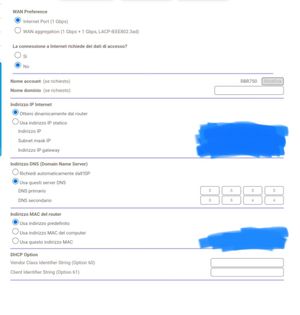
Good morning in the area where I live they have installed pure FTTH fiber optics and therefore I will change ISP. I have an orbi RBK 753 system in router mode connected to the LAN port of the...
- Feb 24, 2025
I don't know Italian that well, however I believe you have the correct configuration on the Orbi system. Automatic DHCP for the WAN side. You can set automatic for DNS or use custom DNS there.

FURRYe38
Feb 24, 2025Guru - Experienced User
Even though you disabled the WiFi on the ISP router, the router is still running on the ISP modem. So would need to either set the ISP modem to bridge mode to disable the ISP router, if it supports it or use the DMZ for the Orbi router. Setting a IP address reservation for the Orbi router on the ISP routers web page so the IP address doesn't change for the Orbi router. Configure the Orbi router for DHCP on the WAN side that is all that's needed for the ISP connection. You'll need to contact the ISP to check on bridge mode support and ISP configuration if you want to put the ISP modem into bridge mode.
Mastra11
Feb 24, 2025Apprentice
Thanks for the reply, so I leave the settings on the orbi as in the photos I posted right? Even now on the modem/router of my current ISP I have reserved the IP address for the orbi. thanks.
- FURRYe38Feb 24, 2025Guru - Experienced User
I don't know Italian that well, however I believe you have the correct configuration on the Orbi system. Automatic DHCP for the WAN side. You can set automatic for DNS or use custom DNS there.