NETGEAR is aware of a growing number of phone and online scams. To learn how to stay safe click here.
Forum Discussion

KevinLiT
Aug 22, 2022NETGEAR Moderator
New - RBR850/RBS850 Firmware Version 4.6.9.11 Released
RBR850/RBS850 Firmware Version 4.6.9.11 Released
New Features:
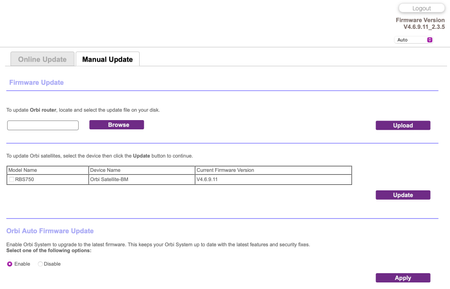
Adds an auto-firmware upgrade enable/disable option <Long awaited feature is FINALLY HERE!
https://kb.netgear.com/...

krwalker
Aug 23, 2022Aspirant
I'm using a privately-owned Arris SB2800 with link aggregation enabled and an Orbi RBR850 with WAN aggregation enabled (and active). The service is XFinity 1200 Mbit and I previously saw 1400/40 speeds via the Orbi speed test from both the web interface and the iOS app.
The hardwired speed tests are done using the AppleTV Ookla Speed test app where I previously and still currently see 940 (the max via the 1 gigabit connection).
I have not factory reset and started over.

FURRYe38
Aug 23, 2022Guru - Experienced User
Be sure your using a good quality LAN cable between the modem and router. CAT6A STP is recommended if your ISP service box supports 2.5Gb WAN port connection rate.
I would try a wired PC connected to the RBR and use Ookla Speed test app. Not sure about onboard app or Orbi app. Onboard app maybe using a server site that's not the most accurate to test with.
I would power OFF the modem for 1 minute the back ON if you do a factory reset on the RBR as well. Be sure to not enable Access Controls, Armor, SPC or Traffic Meter if you reset.
 spewakAug 23, 2022Luminary
I had updated my RBR flawlessly but the Satellite fought me. I couldn't log in. Taking Furry's advice, I reset the RBR and even then, I was met with resistance, on both Router and sat. Finally, I did the 30-30-30 reset and was able to reconfigure and update firmware to both units. I did select to disable the auto-firmware upgrade feature. It is a much appreciated add back in my opinion.
- FURRYe38Aug 23, 2022Guru - Experienced User
Be sure you update the RBS FIRST before updating the RBS.
Glad you got it working. Be sure to save off a back up configuration to file for safe keeping. Saves time if a reset is needed.
https://kb.netgear.com/000062080/How-do-I-back-up-the-configuration-settings-on-my-Orbi-WiFi-System
Enjoy. 📡
spewak wrote:
I had updated my RBR flawlessly but the Satellite fought me. I couldn't log in. Taking Furry's advice, I reset the RBR and even then, I was met with resistance, on both Router and sat. Finally, I did the 30-30-30 reset and was able to reconfigure and update firmware to both units. I did select to disable the auto-firmware upgrade feature. It is a much appreciated add back in my opinion.
- codejanitorAug 23, 2022StarI did the upgrade and the satellite didn't work properly initially - the 5ghz radio didn't start up. Had to power off and power on both RBR and RBS to solve the problem. So far so good. Will probably do a full system reset just in case.