NETGEAR is aware of a growing number of phone and online scams. To learn how to stay safe click here.
Forum Discussion

KevinLiT
Aug 22, 2022NETGEAR Moderator
New - RBR850/RBS850 Firmware Version 4.6.9.11 Released
RBR850/RBS850 Firmware Version 4.6.9.11 Released
New Features:
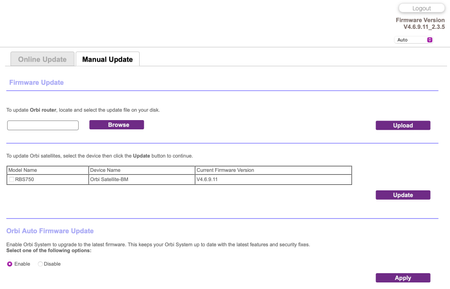
Adds an auto-firmware upgrade enable/disable option <Long awaited feature is FINALLY HERE!
https://kb.netgear.com/...

spewak
Aug 23, 2022Luminary
I had updated my RBR flawlessly but the Satellite fought me. I couldn't log in. Taking Furry's advice, I reset the RBR and even then, I was met with resistance, on both Router and sat. Finally, I did the 30-30-30 reset and was able to reconfigure and update firmware to both units. I did select to disable the auto-firmware upgrade feature. It is a much appreciated add back in my opinion.

FURRYe38
Aug 23, 2022Guru - Experienced User
Be sure you update the RBS FIRST before updating the RBS.
Glad you got it working. Be sure to save off a back up configuration to file for safe keeping. Saves time if a reset is needed.
https://kb.netgear.com/000062080/How-do-I-back-up-the-configuration-settings-on-my-Orbi-WiFi-System
Enjoy. 📡
spewak wrote:
I had updated my RBR flawlessly but the Satellite fought me. I couldn't log in. Taking Furry's advice, I reset the RBR and even then, I was met with resistance, on both Router and sat. Finally, I did the 30-30-30 reset and was able to reconfigure and update firmware to both units. I did select to disable the auto-firmware upgrade feature. It is a much appreciated add back in my opinion.
 codejanitorAug 23, 2022StarI did the upgrade and the satellite didn't work properly initially - the 5ghz radio didn't start up. Had to power off and power on both RBR and RBS to solve the problem. So far so good. Will probably do a full system reset just in case.
- NGSvenskAug 24, 2022Apprentice
Where is the box to shut off auto update?
Thanks
- FURRYe38Aug 24, 2022Guru - Experienced User
Under the Manual Tab in the FW update section of the RBR.
NGSvensk wrote:
Where is the box to shut off auto update?
Thanks
- GarwoofooAug 25, 2022Apprentice
Updated to 4.6.9.11, the upgrade went smoothly and the system is running well.
I have again noticed the "LAN port reset" issue that I saw on the previous firmware. The Statistics screen currently shows an uptime of 16 hours for the system as a whole, but just under two hours for the LAN ports. This means they must have reset at about 6:30 AM this morning UK time when no-one was using the network so again this appears random rather than triggered by specific devices (unless caused by background activity).
As before though this doesn't appear to have any impact on the performance of the network at all so it remains a curiosity rather than an issue.