NETGEAR is aware of a growing number of phone and online scams. To learn how to stay safe click here.
Forum Discussion

KevinLiT
Aug 22, 2022NETGEAR Moderator
New - RBR850/RBS850 Firmware Version 4.6.9.11 Released
RBR850/RBS850 Firmware Version 4.6.9.11 Released
New Features:
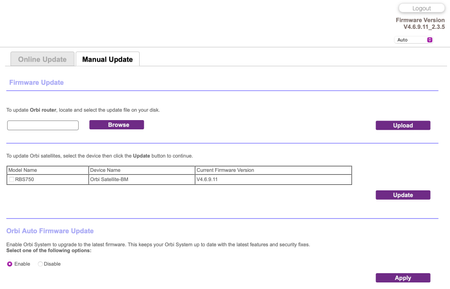
Adds an auto-firmware upgrade enable/disable option <Long awaited feature is FINALLY HERE!
https://kb.netgear.com/...

TC_in_Montana
Aug 24, 2022Virtuoso
Great explanation CrimpOn on what Turn Off Auto Update does.
One thing I question from what I see with scorn242 's attached jpg is that the router checks every minute. I am thinking it is doing that because he has that site blocked. I would think that normally the server would check once or twice a day and then select a new update check time. With the site blocked, not only is it blocking the ability to see whether there is an update or not, it is also blocking the ability to say "I checked and there is none and I'll check again in xxx number of hours".

CrimpOn
Aug 24, 2022Guru - Experienced User
TC_in_Montana wrote:
it is also blocking the ability to say "I checked and there is none and I'll check again in xxx number of hours".
This could very well be correct. This new Block Auto Update option, which has not been ported to previous Orbi models, might have this consequence.
Back in June, I used Wireshark to capture network activity from a test RBR50 that is connected to the local network and had no devices connected to it. (nothing at all) This was intended to ensure that the only network traffic being captured was from the router itself and not from anything connected to the router. Wireshark captured an interesting set of conversations. Here's one of my records showing how many characters were sent and received by this router:
This shows the router contacting Netgear at 1:12 every morning and 14:49 every afternoon. HTTPS packets are encrypted, so I was unable to see what was going on. However, the pattern is exactly the same. Send a packet with 144 characters, get back a packet with 189 characters, etc. etc. At 1:12 the router makes six requests of http.fw.updates1.... and gets back a variety of information. Those asterisks (*) indicate that the DNS request from the router resulted in a different IP address for the update server. For example, on June 12 I recorded:
| 01:12 | 23.5.5.241 | 146 | 575 |
| 104.119.67.89 | 174 | ????? | |
| 23.55.241 | 144 | 189 | |
| 23.55.241 | 144 | 189 | |
| 23.55.241 | 144 | 7504 | |
| 104.119.67.89 | 143 | 181 |
Netgear uses a huge number of IP addresses for http.fw.updates1.netgear.com. I wrote a script to ask CloudFlare, Google, and OpenDNS to resolve http.fw.updates1.netgear.com over and over, and this is what they said:
I have no idea why Netgear uses so many different IPs for the resource, or why CloudFlare, Google, and OpenDNS vary so much.