NETGEAR is aware of a growing number of phone and online scams. To learn how to stay safe click here.
Forum Discussion

KevinLiT
Aug 22, 2022NETGEAR Moderator
New - RBR850/RBS850 Firmware Version 4.6.9.11 Released
RBR850/RBS850 Firmware Version 4.6.9.11 Released
New Features:
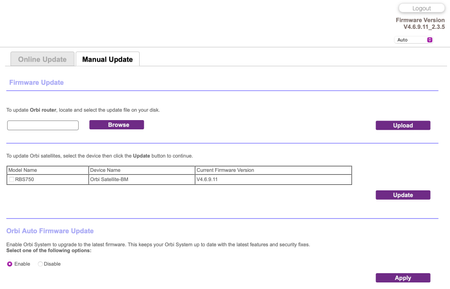
Adds an auto-firmware upgrade enable/disable option <Long awaited feature is FINALLY HERE!
https://kb.netgear.com/...

darbuckle
Sep 05, 2022Tutor
RBS 850 Satellites since upgrading to v 4.6.9.11 broadcast the guest network even though the guest network is disabled. I have factory reset the satellites, they resync just fine, but continue to broadcast the guest network. I saw this in versions prior to 4.6.8.5 but v 4.6.8.5 did NOT have this issue. It has re-materialized in v 4.6.9.11.

FURRYe38
Sep 06, 2022Guru - Experienced User
Did you factory reset the RBS AND RBR as well and setup from scratch?
darbuckle wrote:
RBS 850 Satellites since upgrading to v 4.6.9.11 broadcast the guest network even though the guest network is disabled. I have factory reset the satellites, they resync just fine, but continue to broadcast the guest network. I saw this in versions prior to 4.6.8.5 but v 4.6.8.5 did NOT have this issue. It has re-materialized in v 4.6.9.11.
- darbuckleSep 06, 2022Tutor
I factory reset the RBS's and removed/added them back to the RBR. I have not factory reset the RBR. I have the system setup as AP mode only (i use a separate router). All units on are on version 4.6.9.11. It is a bit cumbersome to factory reset the RBR850 (since default is router mode) and reconfigure back to AP mode.
- FURRYe38Sep 06, 2022Guru - Experienced User
RBR would need to be FR as well.
- darbuckleSep 06, 2022Tutor
I did a full factory reset on RBR850, and RBS850's again (2 satellites)
Configured RBR850 for AP mode.
Re-synced Satellites (successful)
Same Result - Netgear Guest SSID broadcasting when guest network is disabled. It's only the 2.4ghz channels that are broadcasting guest. This was same behavior prior to factory resets and re-syncs.
- FURRYe38Sep 06, 2022Guru - Experienced User
Ok, will look into this. I put my 8 series online the other day...I didn't look as I was focused on something else. I'll check and see and pass this on to NG as well.
Curious, does this still happen in router mode on the RBR and RBS as well?
Also if you go head and enabled GN and set something up and apply it, after it's applied and the system changes, go back and Disable Guest Network and apply, is the GN SSID still seen?
- darbuckleSep 06, 2022Tutor
I have not tested with the RBR850 in router mode, i would have to pull the in place production router and reconfigure network - which unfortunately I cannot do during working hours (dependent for work during the day)
- FURRYe38Sep 06, 2022Guru - Experienced User
No worries. I'll check my system and ask some others as well.
What is the brand and model if the host router your using?
- darbuckleSep 06, 2022Tutor
Host Router is Qnap QHora-301W (ip address 192.168.1.1) - Manages DHCP Range 192.168.1.100 - 192.168.1.254
Other configuration details:
RBR850 Set to AP Mode, static ip of 192.168.1.2
RBS850 Satellite 1, DHCP Assigned 192.168.1.200
RBS850 Satellite 2, DHCP Assigned 192.168.1.201
Network Topology:
- FURRYe38Sep 06, 2022Guru - Experienced User
Great details.
Thank you.
- FURRYe38Sep 06, 2022Guru - Experienced User
When you see this on your wifi app, is this always there or just for a short period of time then goes away.
Others have mentioned that the GN does appear for a short period of time when the RBR and RBS are coming online, then after a few minutes disappears.
darbuckle wrote:
I did a full factory reset on RBR850, and RBS850's again (2 satellites)
Configured RBR850 for AP mode.
Re-synced Satellites (successful)
Same Result - Netgear Guest SSID broadcasting when guest network is disabled. It's only the 2.4ghz channels that are broadcasting guest. This was same behavior prior to factory resets and re-syncs.
- darbuckleSep 06, 2022Tutor
I will see the guest network ssid after boot up, and it persists (and stays broadcasting permanently). i have seen one or the other satellites drop the guest ssid, but it will come back after 20 minutes or so. It also is inconsistent in the 2.4 channel bandwidth between the satellites and router. To me it appears to be a sync issue, but sync/backhaul status indicates good on web page:
- FURRYe38Sep 06, 2022Guru - Experienced User
Ok. Thanks for this.
I asked someone at home to check my 8 series and no GN is being seen. Another let me know that a 7 series isn't seeing this either, though ours are in router mode. I'll check my 7 series in AP mode and see if the AP mode could be causing this...Please edit your picture for MAC Addresses or product serial numbers before posting.
- darbuckleSep 06, 2022Tutor
I want to stress that this was not a problem under firmware 4.6.8.5, it has been introduced in firmware 4.6.9.11, and there have been no configuration changes. Thanks!
- tjtrimbleSep 06, 2022Luminary
darbuckle wrote:I will see the guest network ssid after boot up, and it persists (and stays broadcasting permanently). i have seen one or the other satellites drop the guest ssid, but it will come back after 20 minutes or so. It also is inconsistent in the 2.4 channel bandwidth between the satellites and router. To me it appears to be a sync issue, but sync/backhaul status indicates good on web page:
I first saw the guest SSID broadcasting on mine after the new firmware was installed but it went away on its own after a little while (thinking less than hour) and it hasn't broadcasted since that I am aware of. I have the guest network turned off and running mine in AP mode.
- FURRYe38Sep 06, 2022Guru - Experienced User
Can you enable GN and set something up and apply it and Change the Netgear name to something different, after it's applied and the system changes, go back and Disable Guest Network and apply, is the GN SSID still seen after an hour of being disabled?
Is this seen if the RBS are turned OFF and the RBR alone?
darbuckle wrote:
I want to stress that this was not a problem under firmware 4.6.8.5, it has been introduced in firmware 4.6.9.11, and there have been no configuration changes. Thanks!
- FURRYe38Sep 06, 2022Guru - Experienced User
Got home and got my 7 series online in AP mode static IP. Saw nothing of any guest network being broadcast after I turned the RBR ON, until I turned ON the RBS. I beleive it was the RBS that broadcast the NETGEAR-GuestNetwork and that appeared in my scanner for 10-15 seconds as the RBS was syncing to the RBR. I had set a different GN SSID name and did not enable GN on the RBR just yet. The RBS finally synced and still no GN SSID being seen. I then enabled GN on the RBR and eventaully RBK752-Guest appeared on the scanner. I disabled GN on the RBR and the GN name disappeared here. No longer seen on anything.
RBR750 was connected behind my RBR850 in router mode as I can't configure the 8 series for AP mode currently.
Wondering if there maybe something on your system causing this or in your configuration.
- darbuckleSep 06, 2022Tutor
As requested i changed the guest network name, set a guest password, enabled the guest network.
The guest network came online with all three units broadcasting guest network, and i was able to connect to the guest network.
I then disabled the guest network and waited an hour.
The guest network ssid is still being broadcast (by the two satellites, but not the router) - so only two set channel broadcast on both the 2.4 and 5 ghz channels.
With the guest network DISABLED, i can still connect to the guest network and have a valid ip and internet connection.
I understand you are not seeing this behavior, but I am.
I want to re-iterate i was NOT seeing a guest network under firmware 4.6.8.5 (for six months of operation), with the same router and network configuration. the firmware update to 4.6.9.11 IS causing the problem.
I cannot place a support ticket to resolve because i'm beyond the 90 day warranty period, and i'm not going to pay for more support when it was a firmware update that has created the issue.
will be rebooting the system with the guest network disabled (again) to see if it will sync to satellites.
- FURRYe38Sep 06, 2022Guru - Experienced User
What is the distance between the router and 📡 satellite(s)? 30 feet or more is recommended in between RBR and RBS📡 to begin with depending upon building materials when wirelessly connected.
Great information and detail, I'll pass this along.
- darbuckleSep 06, 2022Tutor
Router is in a basement - both satellites are one floor up - approx 35 feet straight distance, with a floor and 1-2 walls between satellites and router.
- FURRYe38Sep 06, 2022Guru - Experienced User
Would be a good test if you can, bring one RBS closer or even in same room as the RBR and see if enabling again the GN SSID name on the RBR, apply, check, then disable the GN, apply then see if the RBS still continue to broadcast the GN SSID...Turn OFF the other RBS while trying this.
 Blanca_OSep 08, 2022NETGEAR Employee Retired
Hi darbuckle,
We are looking into this and would like to work with you. I will PM you requesting for more information.
Regards,
Blanca
Community Team- ekhalilSep 09, 2022Master
My RBS350 satellites that are connected to RBR850 router got all automatically updated to v4.6.9.11 and are working very well.
- SeansterSep 26, 2022Guide
Could you describe your process to re-sync / re-add your satellites to your router. Am trying to do the exact same thing (Router in AP mode) but no success. I am getting weirdness when I try to factory reset Sat 1 - power LED goes from green to flashing red, I never get to amber....
