NETGEAR is aware of a growing number of phone and online scams. To learn how to stay safe click here.
Forum Discussion

KevinLiT
Aug 22, 2022NETGEAR Moderator
New - RBR850/RBS850 Firmware Version 4.6.9.11 Released
RBR850/RBS850 Firmware Version 4.6.9.11 Released
New Features:
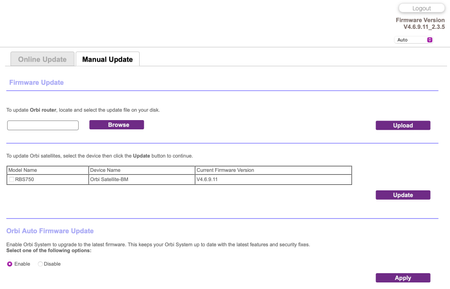
Adds an auto-firmware upgrade enable/disable option <Long awaited feature is FINALLY HERE!
https://kb.netgear.com/...

Seanster
Sep 25, 2022Guide
This firmware seems to have scrambled my entire setup (with a little help by me it seems).
Am running RBR850 in AP mode, with 3 satellites connected by wired backhaul. For some stupid reason I opened the Orbi app on my iPad on Friday and it showed a new firmware available. So I stupidly pressed the button. I believe I must have been looking at the router as it only updated the firmware on the router.
Then the mess began. All of my satellites disappeared from my network map. Went straight to the computer to check, and all satellites showed as disconnected. Logged directly into one of the satellites and, of course, different firmware version. Ok, no problem, I will update the 3 satellites manually, which I did. All satellites came back up fine, blue light etc. and were serving internet just fine.
Return to admin GUI and still all satellites show disconnected (but seem to be still working, although no longer show as part of the network). Ok, so let’s try resetting one of the sats to factory and re-adding the satellite. So I paperclip one of the RBS850’s and it gets weirder - 7 seconds and no amber flashing but red flashing - but satellite seems to have reset as password has reverted to default. Try to now add new satellite to the router but it fails, cannot sync the satellite.
Now at the point where I am not sure what to do. System ‘seems to be working’ although it says things are wrong. So leave it alone. Or revert back to previous firmware and hope for best, or reset everything to factory and start again…
Any advise on best direction gladly appreciated !
- FURRYe38Sep 26, 2022Guru - Experienced User
Has a factory reset and setup from scratch been performed since last FW update?
Seanster wrote:
This firmware seems to have scrambled my entire setup (with a little help by me it seems).
Am running RBR850 in AP mode, with 3 satellites connected by wired backhaul. For some stupid reason I opened the Orbi app on my iPad on Friday and it showed a new firmware available. So I stupidly pressed the button. I believe I must have been looking at the router as it only updated the firmware on the router.
Then the mess began. All of my satellites disappeared from my network map. Went straight to the computer to check, and all satellites showed as disconnected. Logged directly into one of the satellites and, of course, different firmware version. Ok, no problem, I will update the 3 satellites manually, which I did. All satellites came back up fine, blue light etc. and were serving internet just fine.
Return to admin GUI and still all satellites show disconnected (but seem to be still working, although no longer show as part of the network). Ok, so let’s try resetting one of the sats to factory and re-adding the satellite. So I paperclip one of the RBS850’s and it gets weirder - 7 seconds and no amber flashing but red flashing - but satellite seems to have reset as password has reverted to default. Try to now add new satellite to the router but it fails, cannot sync the satellite.
Now at the point where I am not sure what to do. System ‘seems to be working’ although it says things are wrong. So leave it alone. Or revert back to previous firmware and hope for best, or reset everything to factory and start again…
Any advise on best direction gladly appreciated !
- SeansterSep 26, 2022Guide
No, have not reset the entire setup, just one satellite. I did not want to as its a bit of a pain (going back to Router mode etc.). And all was working fine - sats show disconnected but they are functioning as they should, all devices are working fine (they just show that they are connected to the router as opposed to the satellite).
Bigger problem is that I pulled one satellite out, removed it from the GUI, reset it to factory, and now I cannot get it to sync back with the router, and am suspecting that yet again I will have to switch back to router mode to sync this satellite....meh- FURRYe38Sep 26, 2022Guru - Experienced User
ALL RBS on same version of FW?
How are you trying to sync the RBS to the RBR?
Pressing the sync buttons or using the RBRs Add RBS web function?
Did you remove the RBS entry from the RBRs web page?
Does the RBS sync if you ethernet connect it to the RBR?
What is the size of your home? Sq Ft?
Seanster wrote:
No, have not reset the entire setup, just one satellite. I did not want to as its a bit of a pain (going back to Router mode etc.). And all was working fine - sats show disconnected but they are functioning as they should, all devices are working fine (they just show that they are connected to the router as opposed to the satellite).
Bigger problem is that I pulled one satellite out, removed it from the GUI, reset it to factory, and now I cannot get it to sync back with the router, and am suspecting that yet again I will have to switch back to router mode to sync this satellite....meh
