NETGEAR is aware of a growing number of phone and online scams. To learn how to stay safe click here.
Forum Discussion

KevinLiT
Aug 22, 2022NETGEAR Moderator
New - RBR850/RBS850 Firmware Version 4.6.9.11 Released
RBR850/RBS850 Firmware Version 4.6.9.11 Released
New Features:
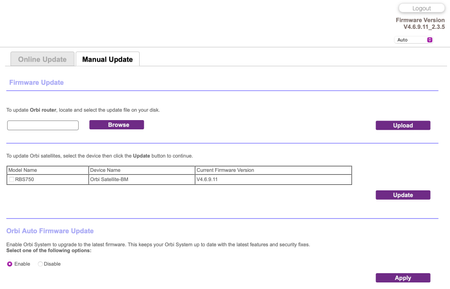
Adds an auto-firmware upgrade enable/disable option <Long awaited feature is FINALLY HERE!
https://kb.netgear.com/...

FURRYe38
Sep 28, 2022Guru - Experienced User
Let us know what happens with a custom server...
Please post a screen capture of what it looks like on the Admin/NTP Settings page.
Validus wrote:
There seems to be a bug with the "Automatically adjust for daylight savings time" on NTP Settings?
In New Zealand it's currently +1 hour for daylight savings, but the time mentioned on the router admin there and under the logs is still back by an hour. Saying it's 10:30am rather than 11:30am. Currently using the default NETGEAR NTP server, might test another.

Validus
Sep 28, 2022Luminary
Originally set to the default Netgear NTP. I had tried to set the NTP to nz.pool.ntp.org today for testing, same results.
Rebooted when the time was 12:01pm.
Yet under the router logs: [Time synchronized with NTP server] Thursday, Sep 29,2022 11:01:32
All of the router log being off by an hour.
Screenshot shows time as 3:39pm, when it's currently 4:39pm.
I'm assuming that NTP servers don't do the daylight saving itself, it would just be the router setting adjusting it for the log files, etc? It won't affect anything on the Internet or within the Network itself, right since it's using UTC?

 GarwoofooOct 11, 2022Apprentice
There is definitely something odd going on with Guest Networks with this firmware.
I don't use Guest Network and never have. But I noticed that following a reboot, the Orbi's Guest Network would show up on the list of available networks for 5-10 minutes before disabling itself again.
Then I had an internet outage that lasted an hour or so. For some reason this caused the Orbi (in AP mode) to turn on the Guest Network and this time it didn't turn off. The only way to disable it was to go into the Guest Network section of the control panel and re-apply the settings which disabled it again.
The worst thing about all of this is that it uses whatever details you have set up for the Guest Network in the control panel - which, if you've never used it, defaults to an unsecured network. I've now changed this to secured but it's not a great situation with regard to security for those that don't use this feature.
- FURRYe38Oct 11, 2022Guru - Experienced User
Ya, we've seen this behavior in this version of FW. We've passed it on to NG.