NETGEAR is aware of a growing number of phone and online scams. To learn how to stay safe click here.
Forum Discussion

ReLFrEoD
Jan 26, 2024Aspirant
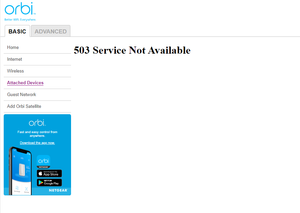
No longer showing attached devices after firmware updated to 7.2.6.21
Please help.

donawalt
Feb 06, 2024Mentor - Experienced User
Wow that could be anything, even a virus on the network. Is the second RBR interfering somehow? Is there an IP address duplicate? Have you tried accessing the RBR web page from another computer or phone/tablet? Can you access the other Satellites and/or AP by IP? I would definitely do some after-hours work - if none of those suggestions fixed it, I would try powering down the other router/AP and see if it clears up. If you have time and it's not too unwieldily I would power down everything, then power up just the main router and modem, and see if it works. Then start bringing things online.
All that said, I would definitely power cycle after hours, you would be amazed how much that fixes that even reboots do not.
ReLFrEoD
Feb 06, 2024Aspirant
It seems that the secondary RBR that is in AP mode and has a combination cat5 and fiber optic backhaul to the primary RBR and the RBSs behind it are less troublesome. I can reach the two RBRs and the RBSs individually by IP from any pc or my cell phone. I have power cycled remotely in the middle of the night with my cell phone and have come in on Saturday one time, but when I came in on Saturday, I could see the attached devices on the browser-based manager. (This made me think that the management console is prioritized lower than the client's internet traffic.)
PS. I can always see the attached devices on my cell phone app.
PSS. I would love to see a network map in the browser-based management GUI similar to the cell phone app.
