NETGEAR is aware of a growing number of phone and online scams. To learn how to stay safe click here.
Forum Discussion

Stahl101
May 16, 2022Guide
Orbi 852 losing connection to wifi constantly
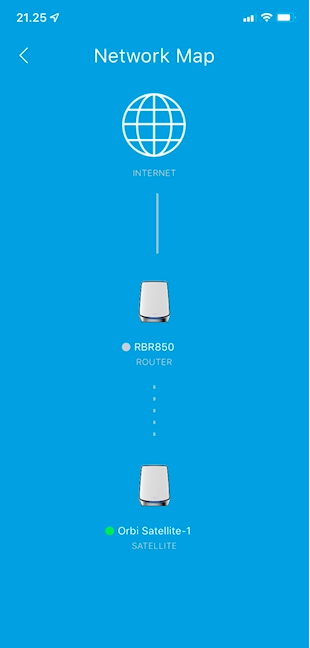
Hi All, I am Constantly losing wifi connection on my Orbi RBK852. Units which are with cable works fine. In the App the RBR850 changes between online and offline. RBS850 (satellite) is online a...

FarmerBob1
May 20, 2022Luminary
When FURRYe38 mentioned "Resetting", what he really meant was using a Paperclip in the "Reset Pin-Hole" on the back above the Power Light. That's a "Pin-Hole" reset that usually fixes most all evils. Not a "Factory Reset".
When I had similar problems this is what I do and did with one of the last FW installs that didn't work out too well. Below is a repeat of an earlier post of which "Yup it's scary!!!" I hope it helps and give you a resource for the future and a way to install Firmware.
From having this same issue the last update I did:
- Factory Reset all three of my units;
- Power Cycled them;
- Pin-Hole Reset them;
- Went into the RBR when they all came back up, using 192.168.1.1. Can't use the Mobile App since I have a Tagged VLAN PPPOE Login to my Fiber provider;
- Updated the Firmware on all three;
- Pin-Hole Reset all three units;
- Unplugged the two Satellites off after they came back from the reset;
- Manually set up the RBR completely (I've done it so much that I have it all memorized);
- After the RBR was up and running to the Internet;
- Connected the Satellites and made sure they connected and the RBR saw them;
- Sat back and had a beer while I waited for all the clients to jump on . . . ;
- The next day I went into the RBR and checked that all was well;
- Then did my speed tests and whatnot;
- Looked through to see what was attached or not, fixed any of that;
- Waited for any screams when someone tried to do or watch something and it didn't work.
- Hid.
I've been dealing with OEM and OpenSource FWs on all kinds of devices: Routers, Switches, TVs, STBs, Computers, Blu-Ray Players, AppleTVs, Amazon Firesticks, Cars . . . for decades and have found that if you put the time and attention into it in the beginning, you're less likely to have any problems afterwards. Like "Bricked" devices. And it's not really the manufacturers "fault" if the proper process is involved and takes time. It just that's where we are at in technology. I only wish it was a Plug-n-Play World, but it's not. Soon.
Stahl101
May 20, 2022Guide
Hi farmerbob1.
What you explain is what i did, except for the beer, and maybe that’s where the fault is 🤣.
Joke aside, I tried everything you explained but still having an issue, and I am now waiting for the push update from NG.
Thx for replying
What you explain is what i did, except for the beer, and maybe that’s where the fault is 🤣.
Joke aside, I tried everything you explained but still having an issue, and I am now waiting for the push update from NG.
Thx for replying
- FarmerBob1May 20, 2022Luminary
OK. I am so sorry that the "Magic Pin-Hole Reset" didn't do you any good. But do keep it in mind for future issues. Or a way to augment the way you install. I trust, the lack of Beer was the missing link to the process.
- FURRYe38May 20, 2022Guru - Experienced User
What is the issue your having have you tried the factory reset on the RBR?
Stahl101 wrote:
Hi farmerbob1.
What you explain is what i did, except for the beer, and maybe that’s where the fault is 🤣.
Joke aside, I tried everything you explained but still having an issue, and I am now waiting for the push update from NG.
Thx for replying - FarmerBob1Jun 08, 2022Luminary
Stahl101 Did you ever get things "resolved"?
- Stahl101Jun 09, 2022Guide
FarmerBob1 Yes and no. When I never got an answer from NG, I startet to disconnect my smart home 58 units, and figured out when I connected my fresh air system from Genvex which is connected by cable, the router starts to get unstable. When it got unstable orbi constantly switch between online and offline. (have tried with several cables between Orbi and genvex)
I am now trying to figure out if it’s orbi that can’t handle Genvex connection or it’s Genvex that is defekt.so yes and no, meaning I found out where the problems starts, but not the reason.
best regards.
- FURRYe38Jun 09, 2022Guru - Experienced User
What is the model# of this Genvex system?
By Cable, meaning ethernet cable?
What CAT# is the cable your using between the Orbi as this Genvex system?
How is it connected to the Orbi system? In back of the RBR?
Stahl101 wrote:
FarmerBob1 Yes and no. When I never got an answer from NG, I startet to disconnect my smart home 58 units, and figured out when I connected my fresh air system from Genvex which is connected by cable, the router starts to get unstable. When it got unstable orbi constantly switch between online and offline. (have tried with several cables between Orbi and genvex)
I am now trying to figure out if it’s orbi that can’t handle Genvex connection or it’s Genvex that is defekt.so yes and no, meaning I found out where the problems starts, but not the reason.
best regards.