NETGEAR is aware of a growing number of phone and online scams. To learn how to stay safe click here.
Forum Discussion

norbertsf
Jun 26, 2024Aspirant
Orbi 960, adding switch and network failure
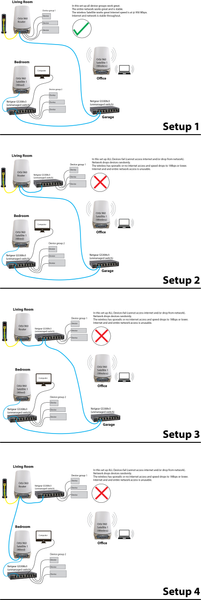
Hi all, Info: Orbi 960 router and 2 satellites. Firmware 7.6.31_5.0.24 Cat 5e cables throughout. Netgear GS308v3 unmanaged switches Motorola MB8611 Cable modem I have factory reset every...
- Jul 01, 2024
Guys thanks for the help on this.
So 2 things.
1. I switched out cable connecting router to the Netgear 16 Port switch, and am now getting 945Mbps, Network solid (wired and wireless).
2. I continued attaching ethernet devices to the switch and apparently my Airport Express 1st Gen was the cause of the network failure. I am going to have to figure out how to set this up or give up on it. ( I used to use it for Apple Airplay - music streaming). It may be more trouble than it is worth.

CrimpOn
Jun 26, 2024Guru - Experienced User
Looking at the network pictures again, it seems that adding the 3rd switch (connecting router and 3 devices) is the common denominator for all failed configurations. I wonder if this switch (a) is a lemon, or (b) has a wiring issue (bent pins?) that is causing network loops. What about:
- Temporarily break the connection from router to the rest of the network, and
- Swap one of the other switches to place between the router and nearby devices.
I have used both Netgear and TP-Link unmanaged switches exactly as shown for years. These are so inexpensive that it might be worth spending $25 to get another GS-308 (or equivalent).
norbertsf
Jun 27, 2024Aspirant
I have already tried those 2 suggestions and the issue still occurs.
1. I tried just running a long ethernet cable from the Orbi Router to an Orbi satellite (so hardwiring it) with no switches on the network. As soon as I add any switch to the Orbi Router ports (2.5 port, 1gig port) the system issue rears its head
2. I tried swapping out the Netgear GS308 for a Netgear GS116 (6 port unmanaged) and a D-Link 16 port DGS-1016D (this one allows turning off EEE), and still same issue.
- FURRYe38Jun 27, 2024Guru - Experienced User
Have same system and GS308 switches here. However also have a XS505M and GS110MX that I use when I have the 960 online.
Normally when I have the XS and GS110MX online, one RBS is directly connected to the XS switch thats behind the RBR, and the 2nd RBS, basement area is connected behind the GS110MX. GS is daisy chained to the XS switch. All using the 2.5Gb ports behind the RBR and RBS.
Now if I don't use the XS and GS110MX, and install GS308 series, All connections are behind the RBR and RBS using there 1Gb ports, not the 2.5Gb ports. I choose not to use the 2.5Gb ports since the 308 series are only 1Gb and no need to take up the 2.5Gb ports if there not being used fully.
Config looks like:
ISP Modem>RBR>GS308>GS308>RBS in basementISP Modem>RBR>GS308>RBS in dinning room
All LAN cables for my home is CAT6A STP in between the ISP mode/RBR/Switches and RBS.
Something to try, bring the RBS to same room or near RBR and let them wirelessly connect. Check the status and should show wireless. After RBS are front BLUE, ethernet connect them to the back of the RBR one at a time. Use the 1Gb ports. Check status and RBRs web page should show WIRED after 5 minutes.
Check connections from the RBS wireless or ethernet connect something behind them.
If all good, Add in a GS308 switch behind the RBR. Connect up a LAN cable behind the RBS and run this to the switch. Connect one RBS to the switch and give it a couple of minutes. Check the RBRs web page for Wired status. After both are good and BLUE, check again from the RBS with a device to see if internet is working here.
- CrimpOnJun 27, 2024Guru - Experienced User
norbertsf wrote:
As soon as I add any switch to the Orbi Router ports (2.5 port, 1gig port) the system issue rears its head
Thanks for describing the switch substitutions. Can you also clarify one other point:
Does "as soon as" include connecting the switch by itself (no devices connected to the switch)?
Adding the switch requires one additional Ethernet cable. Tried more than one cable?
What sort of devices are connected to the router?
- norbertsfJun 27, 2024Aspirant
CrimpOn I'll try that next, connecting the switch at the router without devices. I'm also just going to disconnect everything and see if isolating the Orbi Router no Satellites (wired or wireless) on the system and then adding the switch (and devices) causes the issue.
Will report back.
- norbertsfJun 28, 2024Aspirant
@CrimpOn , Thank you, thank you, thank you!!!
Thank you of the suggestion! Doh!
I removed all devices from the switch that I have been attaching to the Orbi router, (Netgear GS116) and attached to a 1gig port on the Orbi. System LAN and wireless SOLID! I added 2 devices and tested after each add to the switch. System stayed solid. I have 3 more devices to add, and I believe I will come across one that is causing an issue, so I think my problem MAY be solved.
I do have one question tho:
1. WITH the switch attached (NO devices attached to switch) on the network speed test from my LAN connected computer in the other room I get about 600Mbps (consistently) download speed.
2. BEFORE attaching the switch I get @960Mbps (consistently)
Is the switch throttling the speed somehow because of its specs? Should I change to a switch with a 2.5G uplink port to get back up to 900s?
Thank you again! I was losing hair!!!
- norbertsfJul 01, 2024Aspirant
Guys thanks for the help on this.
So 2 things.
1. I switched out cable connecting router to the Netgear 16 Port switch, and am now getting 945Mbps, Network solid (wired and wireless).
2. I continued attaching ethernet devices to the switch and apparently my Airport Express 1st Gen was the cause of the network failure. I am going to have to figure out how to set this up or give up on it. ( I used to use it for Apple Airplay - music streaming). It may be more trouble than it is worth.
- FURRYe38Jul 01, 2024Guru - Experienced User
Glad that was all.
I haven't used my AE in a while. Not sure if it still even works. Used for same thing. Music streaming. Only thing I did on mine back then was set it for a static IP address out side of the default DHCP IP address pool. I use .100 to .150 for my needs. Something to try.
Glad you got it working. Be sure to save off a back up configuration to file for safe keeping. Saves time if a reset is needed.
https://kb.netgear.com/000062080/How-do-I-back-up-the-configuration-settings-on-my-Orbi-WiFi-System
Enjoy. 📡
