NETGEAR is aware of a growing number of phone and online scams. To learn how to stay safe click here.
Forum Discussion

heywoodjahblome
Nov 12, 2021Aspirant
ORBI AP mode ethernet backhaul
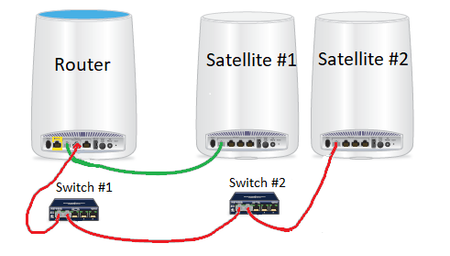
Hello, My Orbi Satellite-2 will not connect via hardwired Ethernet, it will only connect to the backhaul via 5G. The firmware on the satellite is Hardware Version: RBS840 Firmware Version: V3.2.18....

FURRYe38
Nov 12, 2021Guru - Experienced User
Daisy Chain option will not be seen on Orbi AX system FW. It's all automatic.
If your using ethernet connected RBS, it won't be used.
Use same configuration for my RBS. 1 RBS has 3 switches daisy chained on one segment after the RBR.
Do the RBS connect to the back of the RBR and see a wired status?
What is the Mfr and model# of the ethernet switch in the configuration?
What CAT# lan cables are you using? CAT6 is recommended.
heywoodjahblome
Nov 12, 2021Aspirant
WOW thanks for your quick response!
Do the RBS connect to the back of the RBR and see a wired status? I dont understand. Could you maybe rephrase? As soon as I plug the Orbi Satellite-2 into the TPlink switch, it gets a 1Gigabit link light and starts flashing like its communicating, but it immediately disappears from the Attached Devices list in the Orbi RBR page.
What is the Mfr and model# of the ethernet switch in the configuration?
switch #2 = TP-Link TL-SG105-M2 and switch #1 = TRENDnet TEG-S380
there are multiple other devices plugged into those switches and working just fine, the only issue is the Satellite-2
What CAT# lan cables are you using? CAT6 is recommended. I'm using CAT6 for everything.
- FURRYe38Nov 12, 2021Guru - Experienced User
Plug the SAT2 directly to the back of the RBR with out switches and test.
- MNChuckNov 12, 2021Tutor
Furry e38 helped me resolve intermittent issues with my Orbi 753 system, which also had the satellites daisy-chained with switches similar to what you are trying to do. I was not aware that ethernet switches that use the IEEE flow control protocol can cause problems with Orbi's. It appears that the TL-SG105M2 switch you are using does use this flow control protocol, so it may well be the cause of your problem.
I replaced my switches with Netgear ProSafe GS105E and ProSafe GS108E switches (readily available at big box retailers) and my problems were eliminated.
Direct connecting both of your satellites to the router (without any switches) as Furry e38 suggested is a good diagnostic test, and if that works, trying different ethernet switches that do not use flow control would be a good next step.
- heywoodjahblomeNov 12, 2021Aspirant
OK I took a 100 FT Cat5.e cable and plugged it into the back of the Satellite-2 and other end into the back of the RBR840 and the backhaul shows wired now for the Satellite-2.
- FURRYe38Nov 13, 2021Guru - Experienced User
Ok, so that kind of points to the ethernet switches your using maybe cuasing the problem.
I recommend trying a different brand of switch. NG GS-105/108v4, D-Link DGS-105/108 and HP ProCurve 1400/1800 series switches work for Orbi systems.
heywoodjahblome wrote:
OK I took a 100 FT Cat5.e cable and plugged it into the back of the Satellite-2 and other end into the back of the RBR840 and the backhaul shows wired now for the Satellite-2.