NETGEAR is aware of a growing number of phone and online scams. To learn how to stay safe click here.
Forum Discussion

stuaid
Jan 11, 2023Tutor
ORBI RBK 762 2.4G signal not operating at maximum speed
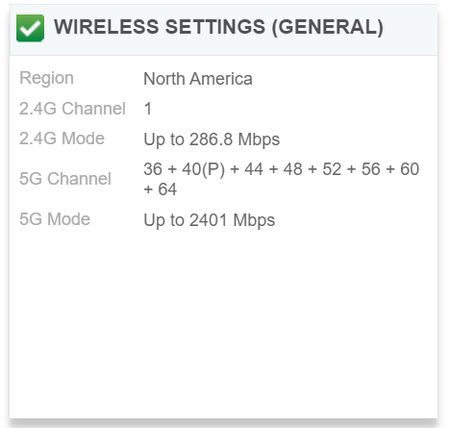
Hi everyone, The 2.4G WiFi of my Orbi RBK762 system is operating at 286.8 Mbps. I have already turned off 20/40 MHz Coexistence and I have also tried other channels. Preamble Mode is set at Autom...

FURRYe38
Jan 11, 2023Guru - Experienced User
Maybe a Web UI display code error here.
Log into the RBS web page and see what is displayed there?
Do you have any devices that can actually connect to the 2.4Gb radio to see what actual connection rate is seen?
What browser are you using?
- CrimpOnJan 11, 2023Guru - Experienced User
Thanks for providing the screen shot. It appears that this system is using only one 20MHz 2.4G channel. Can you check whether AX is enabled or disabled on 2.4G?
My RBR50 shows this:
- stuaidJan 11, 2023Tutor
Hi CrimpOn,
Yes, I do have AX enabled.
- stuaidJan 11, 2023Tutor
Hi FURRY,
Do you mean this page? It still says 286M.
I do not have a smart device that can only connect to 2.4G but according to some of the devices located slightly further away from the router (not so far as the router sometimes assigns 5G to the device and sometimes 2.4G), I have never seen the link speed go above 200M on 2.4G.
I am using Chrome.
- FURRYe38Jan 11, 2023Guru - Experienced User
Ok, that helps.
Please post the screen capture of the RBS web page now. Edit out the SSID name there before posting.
Is 40Mhz Co-existence only enabled Under Advanced Tab/Advanced Settings/Wireless Settings
- CrimpOnJan 11, 2023Guru - Experienced User
It has been so long ago that I honestly cannot remember what I set for the 2.4G channel. My memory is "auto" ( as in, "I don't have a preference, pick whatever you want."), but it clearly displays "8" on the WiFi setup page and this displays as 8(P)+4(S), which implies that this router is using 40MHz width for 2.4G.
How did your router get to "1" for the 2.4G channel?
