NETGEAR is aware of a growing number of phone and online scams. To learn how to stay safe click here.
Forum Discussion

stuaid
Jan 11, 2023Tutor
ORBI RBK 762 2.4G signal not operating at maximum speed
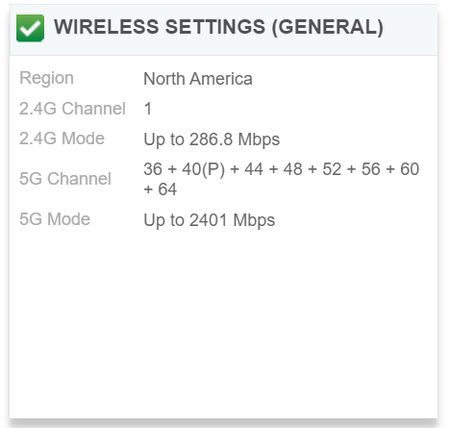
Hi everyone, The 2.4G WiFi of my Orbi RBK762 system is operating at 286.8 Mbps. I have already turned off 20/40 MHz Coexistence and I have also tried other channels. Preamble Mode is set at Autom...

FURRYe38
Jan 11, 2023Guru - Experienced User
Ok, that helps.
Please post the screen capture of the RBS web page now. Edit out the SSID name there before posting.
Is 40Mhz Co-existence only enabled Under Advanced Tab/Advanced Settings/Wireless Settings
stuaid
Jan 11, 2023Tutor
Not exactly sure which web page you are referring to. This is the one I see if I type in the satellite's ip address into my browser.
Coexistence is NOT enabled as I thought this could half the maximum speed?
- FURRYe38Jan 11, 2023Guru - Experienced User
Yes this is the page.
Thank you.
You might go head and open a support ticket on this. Seems to be either a UI Display issue or a FW issue.
Spec sheet shows 600Mbps support on 2.4Ghz. - FURRYe38Jan 17, 2023Guru - Experienced User
Any progress on this?
stuaid wrote:
Not exactly sure which web page you are referring to. This is the one I see if I type in the satellite's ip address into my browser.
Coexistence is NOT enabled as I thought this could half the maximum speed?
- ethanchuehJan 17, 2023AspirantDid this issue solved ? I have exact same problem with my RBK762, which 2.4GHz runs only 286mbps. Disable 20/40 co* already, no help.
- FURRYe38Jan 18, 2023Guru - Experienced User
What firmware is loaded on your system?
ethanchueh wrote:
Did this issue solved ? I have exact same problem with my RBK762, which 2.4GHz runs only 286mbps. Disable 20/40 co* already, no help.