NETGEAR is aware of a growing number of phone and online scams. To learn how to stay safe click here.
Forum Discussion

AwkAndy
Nov 14, 2021Aspirant
Orbi RBK852 - Unable to connect Big Ass Fans - Haiku series
I've just switched from an Orbi RBR50 to an Orbi RBK852 to extend the reach of our mesh network. I had no problems connecting our Big Ass Haiku fans to the Orbi RBR50 but I'm unable to conne...
- Nov 15, 2021
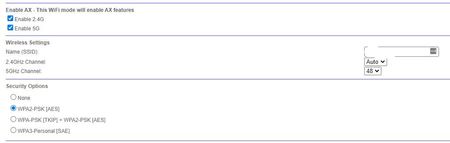
Try CTS avalues to 2347 under Advanced Tab/Advanced Settings/Wireless Settings and see.
AwkAndy
Nov 15, 2021Aspirant
Thanks for the advice. I have used the same SSID name and other devices on the network (iPads, Sonos) automatically connected. I had to reconnect a Ring device but that worked without a problem. I also tried disabling AX mode on 2.4Ghz but that didn't work. As for contacting Big Ass Fans (BAF), I tried that too but they came back with a proforma response that was completely useless (thanks for nothing BAF!). I have a feeling we'll be stuck with using the remote controls for the fans. Oh well, I suppose it's a first world problem.

FURRYe38
Nov 15, 2021Guru - Experienced User
Try CTS avalues to 2347 under Advanced Tab/Advanced Settings/Wireless Settings and see.
