NETGEAR is aware of a growing number of phone and online scams. To learn how to stay safe click here.
Forum Discussion

danielschenk
Sep 14, 2022Guide
Orbi RBR350 in AP mode - not always getting DHCP IP when roaming
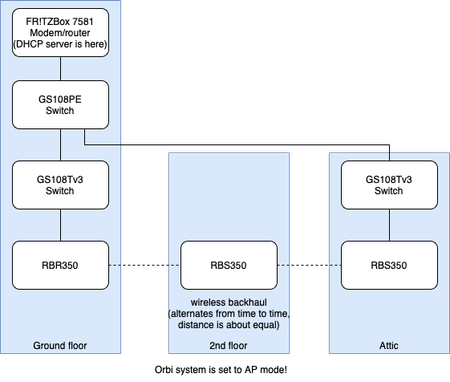
Hi folks, I have a frequent issue with my Orbi setup in AP mode which is quite annoying. When roaming around with my device throughout the house, I often find that I get no connectivity, while th...
danielschenk
Sep 14, 2022Guide
The status of the backhaul is 5G and good. I've never seen it show something different (apart from seeing "synchronising configuration" instead of "good" briefly once in a while, which I assume is normal?)
Below is a screenshot of the status (in Dutch, sorry for that). "verdieping1" is the 2nd floor satellite (yeah, in Dutch we call that 1st floor :D)
Would it still make sense to try to bring it closer to the router when it says good here? This would mean I would move it away from the back of my house which might worsen my backyard coverage. As the summer is now ending anyway here, this might not be a problem for a temporary test 😉 another thing I was thinking of, is hooking it up to one of these Netgear Powerline kits I still have laying around (but they unfortunately don't work that well in my current house).

ekhalil
Sep 14, 2022Master
One of the reasons for “synchronising configuration” is that the satellite lost connection with the router.
So, I’m still suspecting that the issue is caused by a bad radio connection with the satellite.
Please try to test to get the nodes closer or remove some obstacles in between if applicable.
If you have the possibility to use Ethernet over powerline then I would suggest to test that as well, this will for sure be more stable than the wireless backhaul.
So, I’m still suspecting that the issue is caused by a bad radio connection with the satellite.
Please try to test to get the nodes closer or remove some obstacles in between if applicable.
If you have the possibility to use Ethernet over powerline then I would suggest to test that as well, this will for sure be more stable than the wireless backhaul.
- danielschenkSep 14, 2022Guide
Thanks for the tip. I'll first do a test by powering off the 2nd floor satellite, and to make up for the lost coverage, put the system back to 100% TX power, because I think I can survive with that. I think this is a better test for isolating the issue than using a bad powerline adapter or finding a better backhaul spot.
After I've isolated the issue to the 2nd floor satellite this way I can start trying the other things. I will keep you posted.
- CrimpOnSep 14, 2022Guru - Experienced User
I am confused about two aspects of this problem:
- Why does the device make a DHCP request? The major benefit of mesh WiFi is the ability roam seamlessly from one Access Point to another. If the device is switching from one Orbi Access Point to a different Orbi Access Point, this is supposed to be handled IEEE 802.11k/v/r
https://www.tp-link.com/us/support/faq/2097/#:~:text=Fast%20Roaming%20is%20a%20feature,of%20clients%20connected%20to%20them.
I would think that the IP address reservation would remain in effect until it expires. This leads to speculation that what has happened is the device has totally lost connection to WiFi and is thus "starting over". - Connecting Access Points through the WAN port. There have been numerous examples demonstrating that Orbi satellites will not function when the router is in "router mode" and the satellite is connected to the WAN port rather than through a LAN port. The router "knows" where satellites are expected to be and will not talk to one through the WAN port. Yes, "access point mode is different", but I am not sophisticated enough to know exactly how "different". Were I in this position, I would get out my 100ft Ethernet patch cable and (temporarily) connect that attic satellite directly to a router LAN port.
If this solution works, it would be a simple matter of creating a VLAN connection between the satellite and the router LAN port using the GS108 VLAN and the router LAN port.
- GarwoofooSep 15, 2022Apprentice
This sounds a lot like the problem that's been reported in a few threads here where iPhones especially are losing connection when roaming between satellites.
I don't think the precise reason has been identified yet and it looks like an Orbi bug for sure but it does seem to occur more in setups that have a mixture of wired and wireless satellites. Since I moved both of my satellites to wireless I haven't seen the issue.
- ekhalilSep 15, 2022Master
Garwoofoo wrote:This sounds a lot like the problem that's been reported in a few threads here where iPhones especially are losing connection when roaming between satellites.
I don't think the precise reason has been identified yet and it looks like an Orbi bug for sure but it does seem to occur more in setups that have a mixture of wired and wireless satellites. Since I moved both of my satellites to wireless I haven't seen the issue.
It looks like an old issue from 2019 is back now again. I see few people reporting issues with wired backhaul. That issue was caused by loops when a satellite is paired with both wired and wireless backhaul. There was a workaround for that issue at that time:
- Why does the device make a DHCP request? The major benefit of mesh WiFi is the ability roam seamlessly from one Access Point to another. If the device is switching from one Orbi Access Point to a different Orbi Access Point, this is supposed to be handled IEEE 802.11k/v/r
