NETGEAR is aware of a growing number of phone and online scams. To learn how to stay safe click here.
Forum Discussion

zoltarspeaks
Nov 19, 2021Star
Orbi RBR750 Firmware V4.6.5.14_2.0.54 causing WiFi 6 issues
I just upgraded to firmware V4.6.5.14_2.0.54 and now having connection & performance issues. My Samsung Note 10+ which has always connected as WiFi 6 is now constantly loosing WiFi 6 status unless I...

FURRYe38
Nov 19, 2021Guru - Experienced User
What is the Mfr and model# of the Internet Service Providers modem/ONT the NG router is connected too?
What is the size of your home? Sq Ft?
What is the distance between the router and 📡 satellite(s)? 30 feet or more is recommended in between RBR and RBS📡 to begin with depending upon building materials when wirelessly connected.
https://kb.netgear.com/31029/Where-should-I-place-my-Orbi-satellite 📡
What channels are you using? Auto? Try Auto and 48 on 5Ghz. Or try setting manual channel 1, 6 or 11 on 2.4Ghz and 40 to 48 channel on 5Ghz.
Any Wifi Neighbors near by? If so, how many?
You may need to factory reset the system and power the system OFF as well.
https://community.netgear.com/t5/Orbi-WiFi-6-AX-and-WiFi-6E-AXE/New-RBR850-RBS850-Firmware-Version-4-6-3-16-Released/m-p/2150287/highlight/true#M21560
https://community.netgear.com/t5/Orbi-WiFi-6-AX-and-WiFi-6E-AXE/New-RBR850-RBS850-Firmware-Version-4-6-3-16-Released/m-p/2150391/highlight/true#M21575
https://community.netgear.com/t5/Orbi-WiFi-6-AX-and-WiFi-6E-AXE/New-RBR850-RBS850-Firmware-Version-4-6-3-16-Released/m-p/2150417/highlight/true#M21579
zoltarspeaks
Nov 19, 2021Star
The service provider is Verizon Fios and the WiFi in the router is turned off/disabled.
What is the size of your home? Sq Ft: 2300.
What is the distance between the router and 📡 satellite(s)? The router is upstairs where I could run an Ethernet cable from the Fios modem to it. The satellite is downstairs on the complete opposite side of the home - at least 100-feet.
The Orbi is configured as AP mode only.
The Orbi WiFi channels are configured as 2.4GHz Channel: 11 and 5GHz Channel: 36.
I also have a Nighthawk R7900P that I kept since I have older IoT devices that would not connect to the Orbi even after turning off AX on 2.4GHz (per a Netgear tech). It is setup 2.4GHz Channel: 1 and 5GHz Channel: 161. (only 1-5Ghz antenna enabled)
Any Wifi Neighbors near by? If so, how many? There are a few. I am attaching a screenshot from WiFi Analyzer (Android App).
I never had these problems until the firmware update.
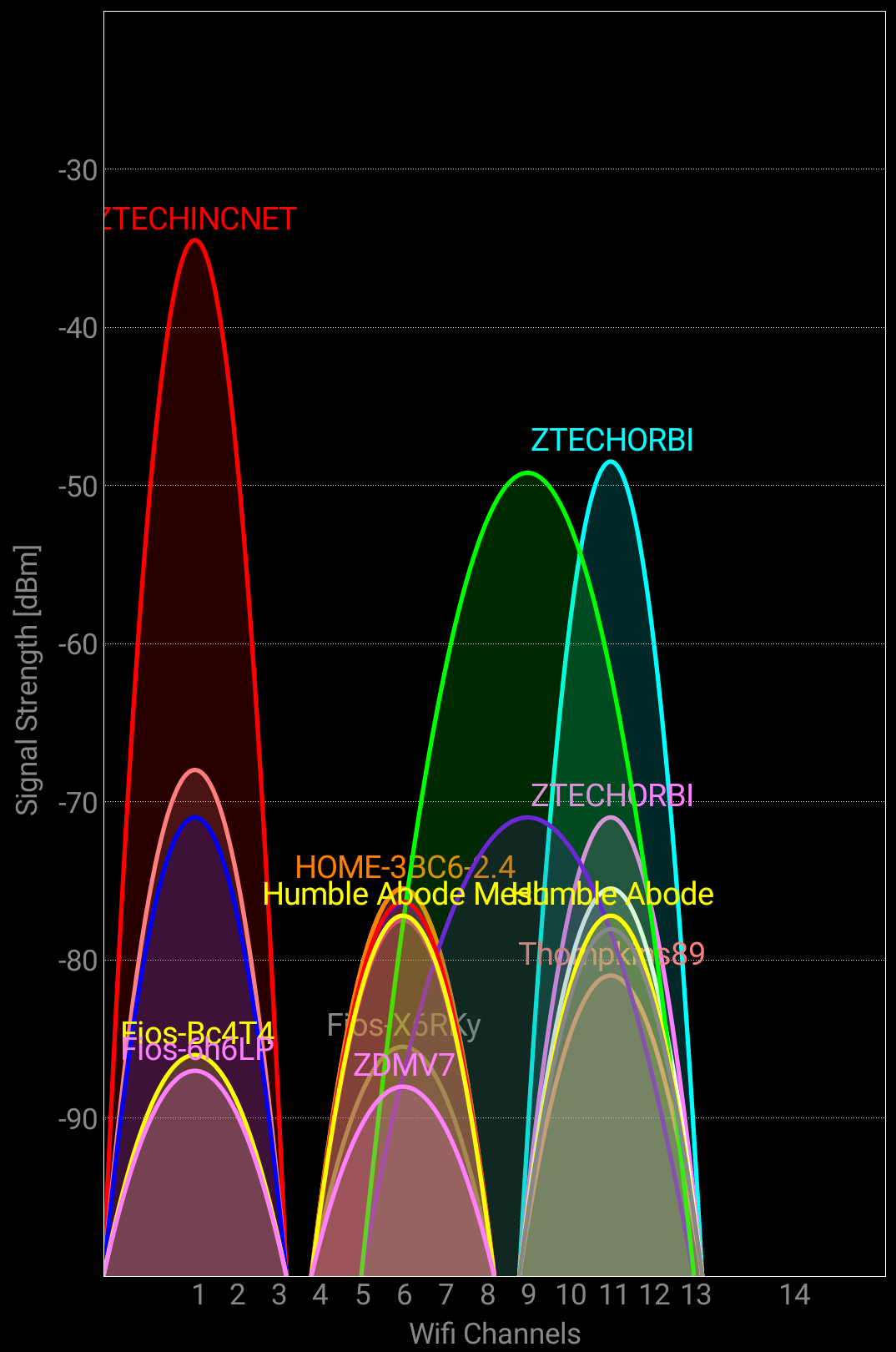
- zoltarspeaksNov 19, 2021Star
Forgot to upload the WiFi Analyzer 5Ghz graph
- FURRYe38Nov 19, 2021Guru - Experienced User
Try disabling AX mode on 2.4Ghz.
Change CTS values to 2347 Under Advanced Tab/Advanced Settings/Wireless Settings
Try using channel 40 on 5Ghz.
You may need to factory reset the system and power the system OFF as well.
https://community.netgear.com/t5/Orbi-WiFi-6-AX-and-WiFi-6E-AXE/New-RBR850-RBS850-Firmware-Version-4-6-3-16-Released/m-p/2150287/highlight/true#M21560
https://community.netgear.com/t5/Orbi-WiFi-6-AX-and-WiFi-6E-AXE/New-RBR850-RBS850-Firmware-Version-4-6-3-16-Released/m-p/2150391/highlight/true#M21575
https://community.netgear.com/t5/Orbi-WiFi-6-AX-and-WiFi-6E-AXE/New-RBR850-RBS850-Firmware-Version-4-6-3-16-Released/m-p/2150417/highlight/true#M21579- zoltarspeaksNov 19, 2021Star
Done Done and Done. Did you want to change CTS on both frequencies? Attaching screenshots of settings. BTW, might I suggest changing the UI in the Advanced/CTS section? At first I thought the setting was not available since it is greyed-out (see screenshots). Then when I realized I could type in the boxes, I made the change.

