NETGEAR is aware of a growing number of phone and online scams. To learn how to stay safe click here.
Forum Discussion

zoltarspeaks
Nov 19, 2021Star
Orbi RBR750 Firmware V4.6.5.14_2.0.54 causing WiFi 6 issues
I just upgraded to firmware V4.6.5.14_2.0.54 and now having connection & performance issues. My Samsung Note 10+ which has always connected as WiFi 6 is now constantly loosing WiFi 6 status unless I...
zoltarspeaks
Nov 19, 2021Star
The service provider is Verizon Fios and the WiFi in the router is turned off/disabled.
What is the size of your home? Sq Ft: 2300.
What is the distance between the router and 📡 satellite(s)? The router is upstairs where I could run an Ethernet cable from the Fios modem to it. The satellite is downstairs on the complete opposite side of the home - at least 100-feet.
The Orbi is configured as AP mode only.
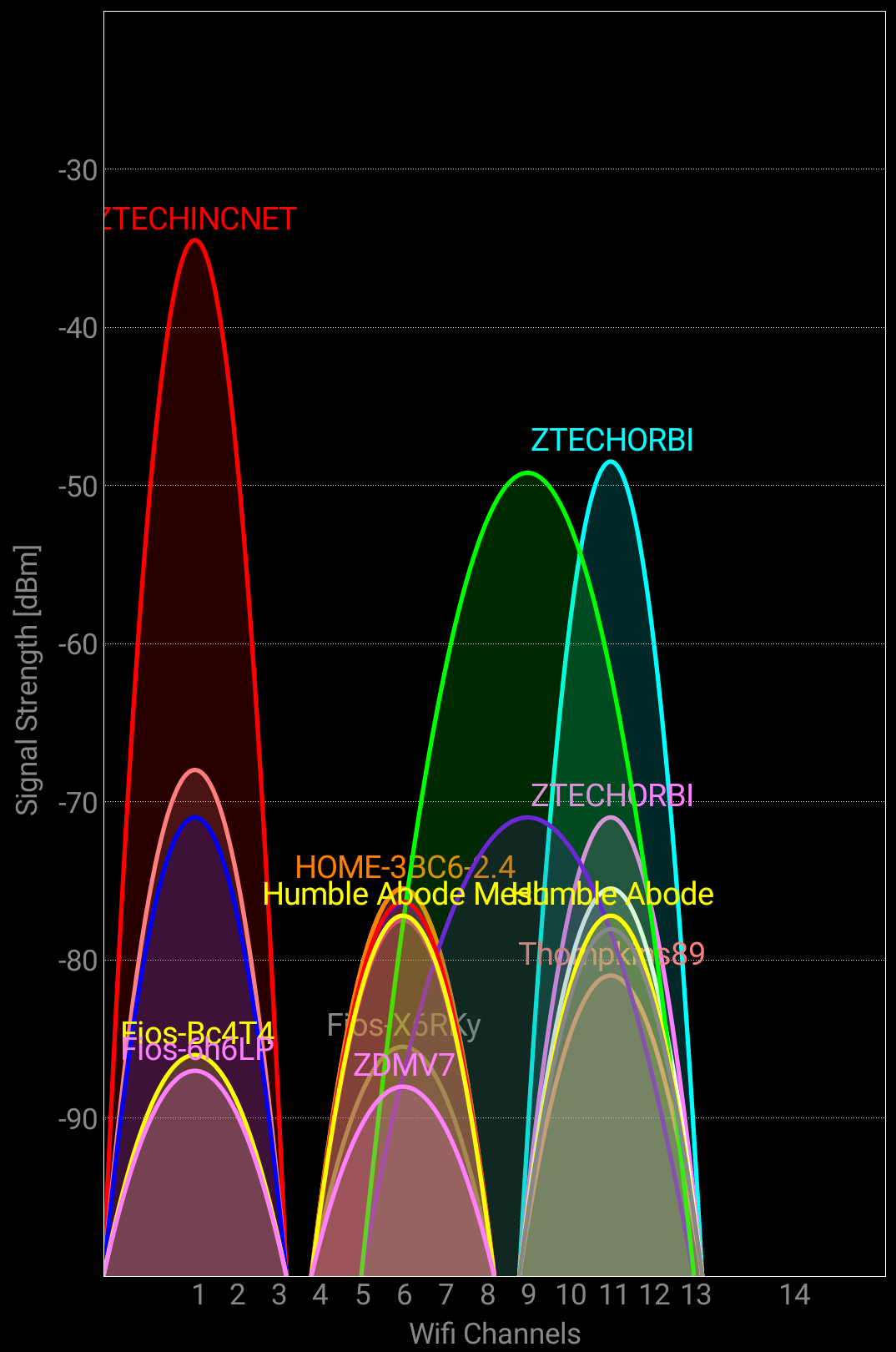
The Orbi WiFi channels are configured as 2.4GHz Channel: 11 and 5GHz Channel: 36.
I also have a Nighthawk R7900P that I kept since I have older IoT devices that would not connect to the Orbi even after turning off AX on 2.4GHz (per a Netgear tech). It is setup 2.4GHz Channel: 1 and 5GHz Channel: 161. (only 1-5Ghz antenna enabled)
Any Wifi Neighbors near by? If so, how many? There are a few. I am attaching a screenshot from WiFi Analyzer (Android App).
I never had these problems until the firmware update.
zoltarspeaks
Nov 19, 2021Star
Forgot to upload the WiFi Analyzer 5Ghz graph
- FURRYe38Nov 19, 2021Guru - Experienced User
Try disabling AX mode on 2.4Ghz.
Change CTS values to 2347 Under Advanced Tab/Advanced Settings/Wireless Settings
Try using channel 40 on 5Ghz.
You may need to factory reset the system and power the system OFF as well.
https://community.netgear.com/t5/Orbi-WiFi-6-AX-and-WiFi-6E-AXE/New-RBR850-RBS850-Firmware-Version-4-6-3-16-Released/m-p/2150287/highlight/true#M21560
https://community.netgear.com/t5/Orbi-WiFi-6-AX-and-WiFi-6E-AXE/New-RBR850-RBS850-Firmware-Version-4-6-3-16-Released/m-p/2150391/highlight/true#M21575
https://community.netgear.com/t5/Orbi-WiFi-6-AX-and-WiFi-6E-AXE/New-RBR850-RBS850-Firmware-Version-4-6-3-16-Released/m-p/2150417/highlight/true#M21579- zoltarspeaksNov 19, 2021Star
Done Done and Done. Did you want to change CTS on both frequencies? Attaching screenshots of settings. BTW, might I suggest changing the UI in the Advanced/CTS section? At first I thought the setting was not available since it is greyed-out (see screenshots). Then when I realized I could type in the boxes, I made the change.
- zoltarspeaksNov 19, 2021Star
Forgot this attachment.