NETGEAR is aware of a growing number of phone and online scams. To learn how to stay safe click here.
Forum Discussion

moonwatcher64
Aug 22, 2022Luminary
Orbi RBR850 - App & Orbilogin say FW up to date but Community says 4.6.8.5 is latest?
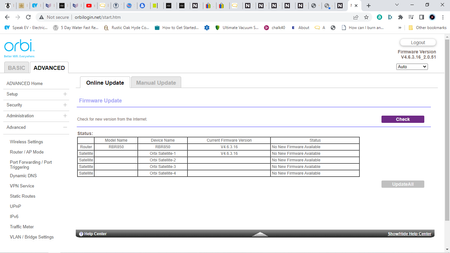
Evening all, Struggling log a support case with Netgear as posted earlier. Hoping someone can help with that but have managed to logon to Orbilogin. Checked basics, and it says the FW is up to da...
moonwatcher64
Aug 23, 2022Luminary
Hi there, thanks for coming back.
That's the problem, the RBS850's don't show any FW version at all .... on the web page or the app. The text boxes are blank and without text.
I've managed to update the RBR850 from some age old version to 4.6.9.11.
I have downloaded the same version for the Orbi sats but it refuses to update. I believe in reality you are supposed to update the sats first.
But I think FW updates should be automatic in the main.When I have run the 'update check' in the past, the router always has reported that everything was up to date which it has not been I can see now.

FURRYe38
Aug 23, 2022Guru - Experienced User
Yes.
Can you log into the RBS web page and check FW version there then update the RBS to v.11 using the RBS web page?
- moonwatcher64Aug 24, 2022Luminary
Had the Netgear guys support me through this and had to be done with laptop directly connected, sat by sat, ip address by ip address.
Time consuming but worked well and now all up to date and consistent.
It was not really clear why it had never occurred automatically from new as the system was very vanilla, premium and unfettled with. But all the same, we are back to scratch.
- FURRYe38Aug 24, 2022Guru - Experienced User
Glad you got it working. Please mark your thread as solved so others will know. Be sure to save off a back up configuration to file for safe keeping. Saves time if a reset is needed.
https://kb.netgear.com/000062080/How-do-I-back-up-the-configuration-settings-on-my-Orbi-WiFi-System
Enjoy. 📡