NETGEAR is aware of a growing number of phone and online scams. To learn how to stay safe click here.
Forum Discussion

moonwatcher64
Aug 22, 2022Luminary
Orbi RBR853 - What do the symbols mean in the Network Map?
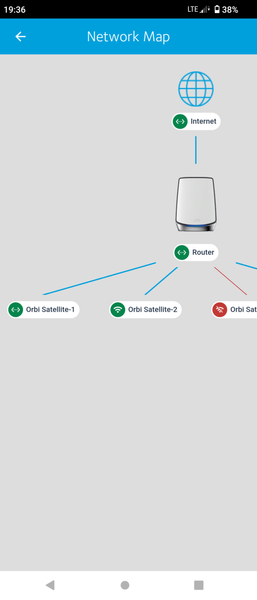
Hi again, is trying to fix an issue I realise I don't understand the small graphics on the Network map. Possible anyone can explain those please e.g the green left & right arrows, the red one I g...

KevinLiT
Sep 02, 2022NETGEAR Moderator
Hello moonwatcher64,
The red lines that you are seeing in the photo indicate that the connected satellites are not currently connected to your Orbi router.
Best,
Kevin
Community Team
- moonwatcher64Sep 06, 2022Luminary
Hi Kevin and thanks for the reply and answer
Yes I assumed red meant off-line but the other graphics were confusing. Again the wifi one seems obvious but the left and right arrows confused me. By deduction it has to 'wired' connections.
But the confusion turns out to be deeper in fact as ALL our Orbi's are 'wired'. In the open case we have (and being supported well) it turns out that even though we can catagorically show and prove that all the Orbi's are wired, that the app / Orbilogin can report that they are 'wireless' .... and more confusing again, this can change and move between Orbi's.
Sounds unlikely I know but is the case. It's being worked through but appears FW independent.
Just for update.
- ekhalilSep 07, 2022Master
moonwatcher64 wrote:........ Again the wifi one seems obvious but the left and right arrows confused me. By deduction it has to 'wired' connections.
........
Yes, the right-left arrows symbol means the satellite is wired to the router (wired backhaul).
If you have a wired satellite that shows it's wirelessly connected, then you should check the backhaul wiring and the used switches, that would mean that there is an issue with the wired connectivity. When satellite thinks the wired backhaul has issues it will try to connect wirelessly if it finds a broadcasted backhaul SSID from any other node to connect to.
- moonwatcher64Sep 07, 2022Luminary
Hi there, yes I agree and indeed in the fault finding this is exactly what we concluded. That there must be a cable fault. But incorrectly it turns out.
The wiring out from the RBR850 goes to a Netgear 48 port switch (no clever settings, no management engaged, just a vanilla switch) and hard wired to an RJ45 wall plate then to the RBS850.
When we saw the 'wireless' symbol, we assumed a cable fault. But then checking out the far end attached devices (TV, Freesat box, Freeview box and a small NG hub) they all confirm and report wired connection. Tested multiple times.
We only find this after port testing and then choosing to re-terminate cables at each end and on two feeds. There where no displayed errors but all the same it's easy to do than not do.
And we used the second hard wired link (there are two installed at the point of the Orbi) .... and even after all that, it still shows 'wireless' connection.
So every piece of proven data shows that the graphical symbol changes without reason.
To confuse things further, after a power cycle, the unit went back to 'wired' for quite some time. Another power cycle and it is back to 'wireless' ... graphically.
The attached devices work perfectly and report no disconnections and show no service issues. And the LED's on the 48 port flash as you might expect.
Is very odd. And since the FW upgrade, (which worked fine ... all on same up to date FW) an Orbi in our shed (wired to a Netgear PoE that has a camera on on it) also now shows a 'wireless' state graphically but runs and operates on 'wired' perfectly well. previously it always shows 'wired' graphical status.
