NETGEAR is aware of a growing number of phone and online scams. To learn how to stay safe click here.
Forum Discussion

senadaruc
Feb 29, 2024Aspirant
Orbi RBRE960 10GB internet port speed issues!
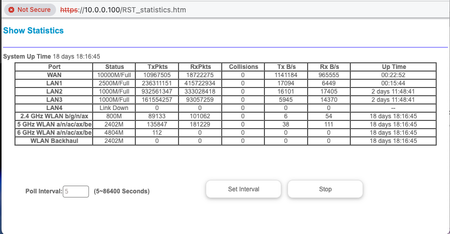
Hello, I have a 10GB router connected with CAT8 Cable into my Orbi RBRE960 10GB internet port on AP mode. Unfortunately, I can't see more than 5GBPS down and 3GBPS upload speed. ...
senadaruc
Feb 29, 2024Aspirant
Thats fine but why i dont see 8GBPS on the speed test ?

FURRYe38
Feb 29, 2024Guru - Experienced User
Possible Orbi's choice in testing site. I believe the FW auto picks something closest to your location. Possible test location could be busier than others. Possible host router could be interfering with speed test app on RBR. Possible issue in FW as well. Your probably first person to post about this with having this higher ISP speed. Haven't seen a lot of users at this speed. Some of us are still down here at the 1Gb level. 😉
- senadarucFeb 29, 2024Aspirant
Thanks for the kind helpe and is there a option to change the soeedtest server?
- senadarucFeb 29, 2024Aspirant
I thought the speed was limited because it is on AP mode.
- FURRYe38Feb 29, 2024Guru - Experienced User
Technically it should not be limited as there is less being processed while in AP mode from Router mode.
Ya, no way to user select a different server. Something I wish NG would include, if possible.
- plemansMar 01, 2024Guru - Experienced User
I'd agree with FURRYe38 that its probably a result of the speedtest server that is automatically picked with netgears built-in speedtest. We didn't recommend it for people with gigabit service for the longest time because many of the auto-picked servers wouldn't saturate gigabit. We're not seeing that issue as much anymore, but now that users are getting multigig services, I imagine we'll see it crop up more frequently.
