NETGEAR is aware of a growing number of phone and online scams. To learn how to stay safe click here.
Forum Discussion

N4cE
Jan 26, 2022Guide
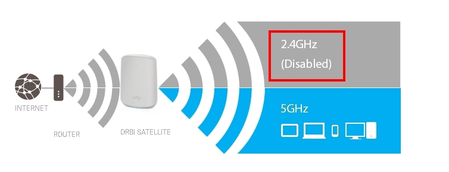
Orbi satellite disable 2.4g automatically
Hi all, I have a set of orbi RBK353 in my house. Someday I found all my IOT with 2.4g equipment are connected to my main router instead of the nearest satellite. So some of my IOT equipment got weak...
- Feb 12, 2022
Hello!
Didn't set the 2.4G transmission below 100%?
I also had this problem, but with this setting ok:

FURRYe38
Feb 07, 2022Guru - Experienced User
Other users have reported calling up NG support and getting a new version of FW for the 3 series.
I recommend you contact them and give them your experiences and see if this new FW version is available to you.
GroundGio
Feb 11, 2022Guide
I am facing the same issue here. Suddenly the 2.4 ghz wifi is disconnected on 1 satelite, few hours later on both satelites. All IoT devices go offline, and I can't control them anymore.
There is no interference with other networks, just my Orbi set and no neighbours or Wifi at all in the surroundings.
If I reboot the rooter, all is back normal again.
Firmware is up to date and due to other issues, same firmware has been flashed to routers and satelites again.
I am using the Orbi 353 set now for one week, and untill now I had problems with:
- 2.4ghz Wifi
- Port forwording for the RTSP protocol (port 554) is not accepted by the router.
- LAN IP range suddenly changes from 192.168.x.x to 10.x.x.x, so all devices with fix IP go offline
I bought this quite expensive set to have a steady solution in my house that I can count on.
Untill now it has been a disaster. It has cost me a lot of time to find out why again "there is no internet at home"
I have created tickets fot these issues and there is contact with support, but I don't feel the answers I get are going towards a solution.
Will give it a couple of more days, but I got a feeling this set will go back to the reseller.
- ekhalilFeb 11, 2022Master
GroundGio wrote:.......
- LAN IP range suddenly changes from 192.168.x.x to 10.x.x.x, so all devices with fix IP go offline
........
The fact that Orbi changes LAN range shows that you have another router set up in the network.
Please make sure either Orbi or the other router is set to bridge/AP mode or setup DMZ forwarding and disable DHCP server in the ISP router. This is usually a cause of quite many internet access issues. Orbi is very sensitive to multiple NAT.
But, the 2.4GHz band issue is very unlikely to be caused by this.
- GroundGioFeb 11, 2022Guide
I can understand you are pointing in this direction, that was also my first reaction. But my ISP modem/router is in bridge mode with Mac passthrough to the Orbi router. All other options are turned down. I can also see the public IP config in the WAN section of the Orbi router.
But, fingers crossed, this only happened the first two days the Orbi was installed. It has been OK now for 5 days.
In the meanwhile I'm waiting on a reaction from NG support on the new FW that hopefully could resolve the 2.4G Wifi issue.
And I honestly think the port forwarding issue is on a dead track. Last advise given from NG support is to reset the router.
And thank you guys for your reactions in helping to find a solution!
- FURRYe38Feb 11, 2022Guru - Experienced User
Let us know the results after a few days.
GroundGio wrote:
I can understand you are pointing in this direction, that was also my first reaction. But my ISP modem/router is in bridge mode with Mac passthrough to the Orbi router. All other options are turned down. I can also see the public IP config in the WAN section of the Orbi router.
But, fingers crossed, this only happened the first two days the Orbi was installed. It has been OK now for 5 days.
In the meanwhile I'm waiting on a reaction from NG support on the new FW that hopefully could resolve the 2.4G Wifi issue.
And I honestly think the port forwarding issue is on a dead track. Last advise given from NG support is to reset the router.
And thank you guys for your reactions in helping to find a solution!
- N4cEFeb 12, 2022Guide
GroundGio wrote:I can understand you are pointing in this direction, that was also my first reaction. But my ISP modem/router is in bridge mode with Mac passthrough to the Orbi router. All other options are turned down. I can also see the public IP config in the WAN section of the Orbi router.
But, fingers crossed, this only happened the first two days the Orbi was installed. It has been OK now for 5 days.
In the meanwhile I'm waiting on a reaction from NG support on the new FW that hopefully could resolve the 2.4G Wifi issue.
And I honestly think the port forwarding issue is on a dead track. Last advise given from NG support is to reset the router.
And thank you guys for your reactions in helping to find a solution!
For 2.4g issue, if u get a new firmware from NG, can you share it?
I think lots of people have some issues but can not reach to NG support.
- FURRYe38Feb 12, 2022Guru - Experienced User
NG Support can be reached here:
https://my.netgear.com/support/contact.aspx
N4cEI think lots of people have some issues but can not reach to NG support.
