NETGEAR is aware of a growing number of phone and online scams. To learn how to stay safe click here.
Forum Discussion

bobthetechie
Jul 20, 2024Aspirant
Orbi Satellite RBS850 wired backhaul shows as connected device not in Satellite list
I just switched a poorly connecting RBS850 Satellite from WiFi backhaul to Wired backhaul. The firewall between the garage and the main house was preventing a strong signal between this Satellite an...
bobthetechie
Jul 22, 2024Aspirant
Thanks for responding.
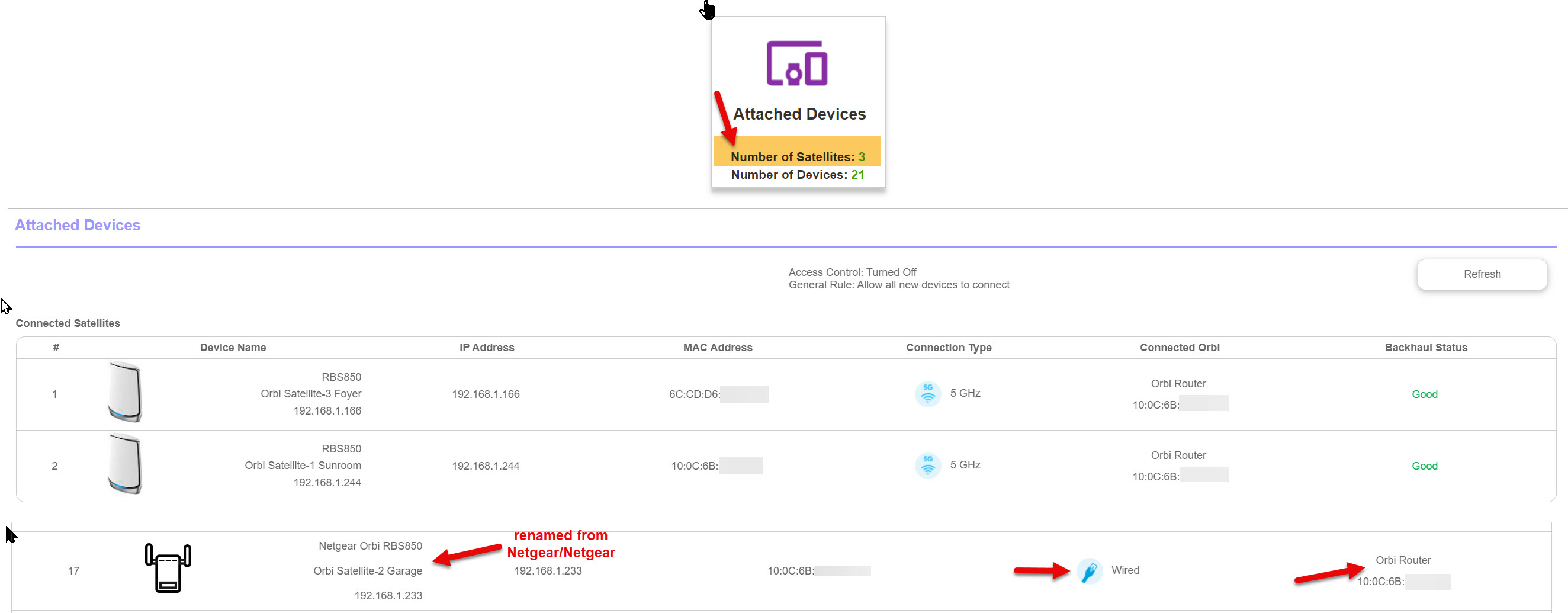
firmware in both: V7.2.6.31_5.0.24 (see the attached jpg file)
The Garage RBS is directly connected from the Ethernet port on the RBS to the Ethernet port on the RBR. I ran the cable myself and checked the quality with an Ethernet cable tester. There are no network devices (switches, etc.) in the cable run.
CAT 6 cable was used from a new spool of cable.
Additional information:
In the Orbi Management GUI, under Advanced/Administration/Firmware Update, all 4 Orbis are listed, so the GUI knows that it is a Satellite. (see the attached jpg file)
Devices are connecting to the Garage RBS and show up in the main GUI as connected to the Garage RBS MAC Address in the "Connected Orbi" column.
I can log into the Garage RBS and it uses the same credentials as the RBR. This GUI shows the one wired device and the two wireless devices that are connected to this RBS.


CrimpOn
Jul 22, 2024Guru - Experienced User
Would it be convenient to
- Do a Factory Reset on the garage satellite.
- Delete the garage satellite from the configuration.
- Go through the Add Orbi Satellite process to add the garage satellite again.
- Open the Attached Devices display and verify that the garage satellite
- Has the same device name as the other two satellites ("RBS850")
- Has the same picture as the other two satellites.
I am wondering if the process of changing the satellite information on the Attached Devices display "did something" to cause part of the Orbi firmware to believe it is a satellite and other parts of the firmware to think it is "something else".
When individual devices are modified in the Attached Devices display, there is a Pull Down menu of choices (not nearly enough, but that's a different issue). My system shows pictures specific to each satellite. (RBS50 has a different picture than RBS40V). Where do these pictures come from? How does the router know which picture to use for each satellite?
Just a thought. Probably not helpful.
- bobthetechieJul 28, 2024Aspirant
Thanks to both of you for your replies. I was going to try the factory reset this weekend but never got around to it. If that didn't work, I was then going to try swapping satellites.
I just checked and "suddenly" everything is back to as it should be. The garage Satellite is now showing normally. Weird, I did nothing!
I've attached a screenshot from the GUI.
We'll see if it sticks.
- CrimpOnJul 28, 2024Guru - Experienced User
If only "do nothing" would work on my garbage disposal. I HATE crawling under the sink!
