NETGEAR is aware of a growing number of phone and online scams. To learn how to stay safe click here.
Forum Discussion

sujay265
Jun 23, 2023Tutor
Orbi960 Wired Backhaul link Speed capped at 100 Mbps
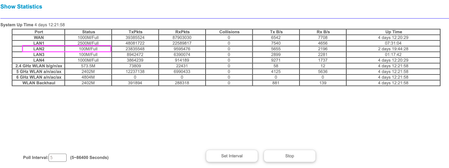
Hi I have set up my new Orbi 960 wifi mesh for 2 week now. I have connected the Router and Satellite via. CAT6 cable (Wired Backhaul). I noticed the link speed (LAN 2) between the Router and Satell...
- Jun 24, 2023
I agree, bad wiring will cause the connection speed to drop to 100 (or nothing if it is really bad). But, that said, why you see a 500Mbps connection through a device claiming 100Mbps max is surprising, right?
Here's a super easy test for you to eliminate the cabling variable:
Take your satellite and place it 3-6 feet from the RBR and connect it with a short CAT5e or CAT6 patch cable and check the reported link speed. If you get the 2500 or 1000 that you should be able to, then you know the wiring is faulty. If you do not, then the problem is something else - perhaps a port on one of the devices or the software reporting an incorrect link speed (which I have not seen happen on my system).
Alternatively, if you have two Sats (I don't know what you have on the other port that is hitting 2500), swap them and see if the problem follows the Sat or the cable.
Do whichever is easier and let us know what happens.

sujay265
Jun 25, 2023Tutor
Thank you guys for your expert advise.
I found that the fault was in the CAT6 cable at the satellite side. Fixed the cable and solved the issue.

FURRYe38
Jun 26, 2023Guru - Experienced User
Glad you got it working. Be sure to save off a back up configuration to file for safe keeping. Saves time if a reset is needed.
https://kb.netgear.com/000062080/How-do-I-back-up-the-configuration-settings-on-my-Orbi-WiFi-System
Enjoy. 📡