NETGEAR is aware of a growing number of phone and online scams. To learn how to stay safe click here.
Forum Discussion

Meddyb
Jan 25, 2022Aspirant
Orbilogin issue
Hello All, I have recently bought an Orbi AX6000 ( RBR850 + RBS852) I never could connect to the orbilogin.com or .net, nor via the Ip address as I am always prompted with the hereunder message no ...

 Jan 26, 2022
Meddyb wrote:Thanks Mikey,
I can't reset now as I am working from home, I'll do that later in the week hopefully
The result as stated in the very first message is the same
I just tried again on http://10.0.0.1 and same issue
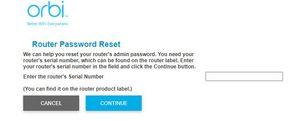
If you see "Router Password Reset" screen then it means you entered the wrong Username/Password. If your browser is not displaying a popup dialog to enter Username and Password before showing the page, then something on your PC is preventing it from appearing or blocking the input.
Have you tried going to http://10.0.0.1 on another device, like your phone's browser?
Mikey94025
Jan 25, 2022Hero
Meddyb wrote:The browser I use is chrome and explorer to try to get there.
It is very strange that if your device's network gateway is configured to your Orbi in Router mode that going to that IP address doesn't access the Orbi's admin website. When you try the IP, what is the error displayed by the PC browser? If this is on a laptop, can you also try on a different device, like your mobile phone's browser?
If this is a PC, can you Win-R "cmd" and give us the output of "ipconfig" for IP Address / Default Gateway and confirm this is the IP address of your Orbi? For example mine shows:
IPv4 Address. . . . . . . . . . . : 192.168.1.40
Subnet Mask . . . . . . . . . . . : 255.255.255.0
Default Gateway . . . . . . . . . : fe80::ca9e:43ff:fed6:1327%12
192.168.1.1