NETGEAR is aware of a growing number of phone and online scams. To learn how to stay safe click here.
Forum Discussion

Meddyb
Jan 25, 2022Aspirant
Orbilogin issue
Hello All, I have recently bought an Orbi AX6000 ( RBR850 + RBS852) I never could connect to the orbilogin.com or .net, nor via the Ip address as I am always prompted with the hereunder message no ...

 Jan 26, 2022
Meddyb wrote:Thanks Mikey,
I can't reset now as I am working from home, I'll do that later in the week hopefully
The result as stated in the very first message is the same
I just tried again on http://10.0.0.1 and same issue
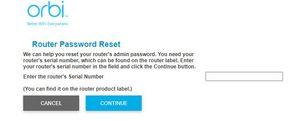
If you see "Router Password Reset" screen then it means you entered the wrong Username/Password. If your browser is not displaying a popup dialog to enter Username and Password before showing the page, then something on your PC is preventing it from appearing or blocking the input.
Have you tried going to http://10.0.0.1 on another device, like your phone's browser?
Meddyb
Jan 25, 2022Aspirant
Thanks Mikey,
I can't reset now as I am working from home, I'll do that later in the week hopefully
The result as stated in the very first message is the same
I just tried again on http://10.0.0.1 and same issue
Mikey94025
Jan 26, 2022Hero
Meddyb wrote:Thanks Mikey,
I can't reset now as I am working from home, I'll do that later in the week hopefully
The result as stated in the very first message is the same
I just tried again on http://10.0.0.1 and same issue
If you see "Router Password Reset" screen then it means you entered the wrong Username/Password. If your browser is not displaying a popup dialog to enter Username and Password before showing the page, then something on your PC is preventing it from appearing or blocking the input.
Have you tried going to http://10.0.0.1 on another device, like your phone's browser?
- MeddybJan 26, 2022Aspirant
Hi Mikey,
That's a very good point and my apologize for not raising this, as I took it as granted as being part of Netgear issue and it's probably on my side.
I am indeed prompted with a login/pwd box in which I enter my login details as you can see hereunder.
Now this is a major breakthrough for my understanding, since this clearly indicates that the root cause of this is the credentials !
I know now I have no choice but to reset-up everything from scratch !
Thanks a lot both for your kind support you and plemans
- MeddybJan 26, 2022Aspirant
One last question for the reset procedure please
Does the paperclip procedure have to be done on both the router and the satelite or just the router ?
Thanks
- Mikey94025Jan 27, 2022Hero
Meddyb wrote:One last question for the reset procedure please
Does the paperclip procedure have to be done on both the router and the satelite or just the router ?
Thanks
You only need to reset the router via the paper clip.
- Mikey94025Jan 27, 2022Hero
Meddyb wrote:One last question for the reset procedure please
Does the paperclip procedure have to be done on both the router and the satelite or just the router ?
Thanks
But you don't need to use the paperclip and reset the router if all you need to do is reset the password. You might try just resetting the password first, otherwise you will have to complete the Orbi setup all over again. Have you tried following the instructions and start by entering the serial number as prompted?
- MeddybJan 27, 2022Aspirant
Hello,
Just to confirm I have reset the RBR850 ( the RBS did not seem to work with the paperclip procedure ) and it's all fine now finally !
I can access the routeur configuration page
I have set the AP mode
Thank you