NETGEAR is aware of a growing number of phone and online scams. To learn how to stay safe click here.
Forum Discussion

VYG
Jul 22, 2021Aspirant
Packet loss for wired device on RBK352
Hi all any suggestion oin this one : Orbi's are connected via wired backhaul. Synology NAS is connected to a main one. When I ping the main one there is no packet loss, whilst doing this I ping the ...
VYG
Jul 22, 2021Aspirant
What Firmware version is currently loaded? V4.3.4.8_1.9.53
What is the Mfr and model# of the Internet Service Providers modem/ONT the NG router is connected too? There is no CPE in front of NG equipment.
The NAS is connected to which unit? RBR or RBS? The NAS is attached to RBR.
Ping the 'main one'? What is this? RBR or RBS? The main one is RBR.
What is the size of your home? Sq Ft? The size of the appartment is around 75 square meters.
What is the distance between the router and 📡 satellite(s)? 30 feet or more is recommended in between RBR and RBS📡 to begin with depending upon building materials when wirelessly connected. RBR and RBS are connected via weired backhaul.
Are the RBS wired directly to the back of the RBR or is there a LAN switch in between? If there is, What is the Mfr and model# of the Internet Service Providers modem/ONT the NG router is connected too? The RBS is conncted directly to RBR.
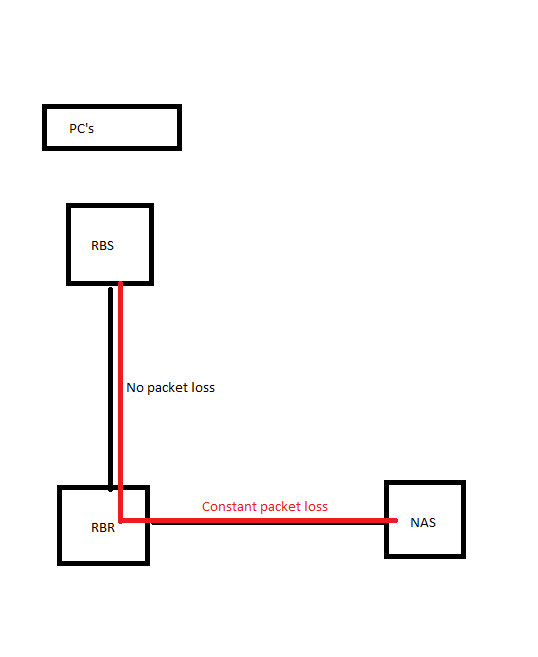
I have attached a file which describes the current setup, but it is pretty primitive....

FURRYe38
Jul 22, 2021Guru - Experienced User
So if you connect yoru PC at the RBR and ping the NAS, any packet loss?
What CAT version of LAN cables are the RBS and NAS using that connects them the RBR?
Ment to say, is there any LAN switches being used between the RBR and RBS or NAS or are they all direct cable connected?
- VYGJul 22, 2021Aspirant
So if you connect yoru PC at the RBR and ping the NAS, any packet loss? If I connect the PC to RBR or RBS directly via cable no issue is observed.
What CAT version of LAN cables are the RBS and NAS using that connects them the RBR? CAT5, CAT6 were tested.
Ment to say, is there any LAN switches being used between the RBR and RBS or NAS or are they all direct cable connected? No switch in between.
So I am honestly puzzled with this one, the only thing which I managed to trace is that pretty a lot of files were uploaded / downloaded at that time from NAS, looks like there is a corelation.
But how?
Can that be that RBR which is a gateway was experiencing some issues with perfromance at that time? But NAS is connected direclty to NAS via cable so it should not affect anything related to radio??
- FURRYe38Jul 22, 2021Guru - Experienced User
VYG wrote:So if you connect yoru PC at the RBR and ping the NAS, any packet loss? If I connect the PC to RBR or RBS directly via cable no issue is observed.
What CAT version of LAN cables are the RBS and NAS using that connects them the RBR? CAT5, CAT6 were tested.
So no PL issues seen via wired connection. You do see pack loss when connected wirelessly?
Can that be that RBR which is a gateway was experiencing some issues with perfromance at that time? But NAS is connected direclty to NAS via cable so it should not affect anything related to radio??
What is the size of your home? Sq Ft?
What is the distance between the router and 📡 satellite(s)? 30 feet or more is recommended in between RBR and RBS📡 to begin with depending upon building materials when wirelessly connected.- VYGJul 22, 2021Aspirant
@VYG wrote:
So if you connect yoru PC at the RBR and ping the NAS, any packet loss? If I connect the PC to RBR or RBS directly via cable no issue is observed.
What CAT version of LAN cables are the RBS and NAS using that connects them the RBR? CAT5, CAT6 were tested.
So no PL issues seen via wired connection. You do see pack loss when connected wirelessly?. Yes, the issue is observed only if I am conncted wirelessly to RBS.
Can that be that RBR which is a gateway was experiencing some issues with perfromance at that time? But NAS is connected direclty to NAS via cable so it should not affect anything related to radio??
What is the size of your home? Sq Ft? The flat is 75 sq. F
What is the distance between the router and 📡 satellite(s)? 30 feet or more is recommended in between RBR and RBS📡 to begin with depending upon building materials when wirelessly connected. The distance beween RBS and RBR is 32 feets.But! RBR and RBS are backhaulved via wired connection, so there must not be any packet loss between RBS and RBR. So the guess is:- either RBS and RBR are still talking to each other via wireless backhaul
- or there is something beween this chain - PC>RBR>RBS - and it should be RBR then......