NETGEAR is aware of a growing number of phone and online scams. To learn how to stay safe click here.
Forum Discussion

vkashat
Mar 14, 2025Aspirant
RBK763 Satellite Wrongly Shows Disconnected
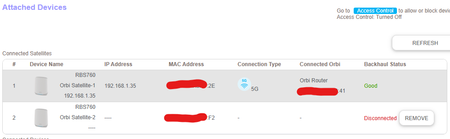
Hello! I have an RBK763 system, one router plus two satellites. For some reason, One of the satellite's says it is disconnected, when it is certainly not. Another issue I noticed is there's a mix up...

FURRYe38
Mar 14, 2025Guru - Experienced User
What happens if you swap RBS around with each other, problem follows or remains at the one remote location?
Bring the one RBS that reports disconnected to same room as RBR and ethernet connected it behind the RBR.
Is this seen as well in Orbi app?
How are the RBS ethernet connected? Behind the RBR or is there a LAN switch in between the RBR and RBS?
What CAT# lan cable are you using? CAT6 is recommended.
What is the size of your home? Sq Ft?
What is the distance between the router 📡 and satellite(s)🛰️? 30 feet or more is recommended in between RBR 📡 and RBS 🛰️ to begin with depending upon building materials when wired or wirelessly connected.
https://kb.netgear.com/31029/Where-should-I-place-my-Orbi-satellite 🛰
vkashat
Mar 14, 2025Aspirant
Swapping them seems to have resolved it for now.
To answer your other questions, the satellites were connected with wireless backhaul, house is 3000 sqft, not sure the exact distance between each device but considering they are on different floors I would think there's enough distance and physical material between them.
- FURRYe38Mar 14, 2025Guru - Experienced User
Ok, see if it happens again.
Distances is important, along with placement and building materials. I'd get a better idea of distance if you can. 30 feet is starting distances between the units.