NETGEAR is aware of a growing number of phone and online scams. To learn how to stay safe click here.
Forum Discussion

AKLGUY
Feb 23, 2023Apprentice
RBK852 in Router Mode Internet Slows to 100MB up/down
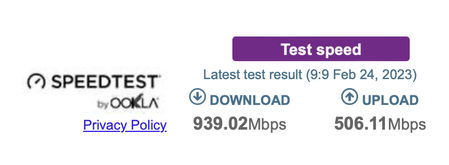
Hi team I have had the 852 for a while now always had it behind another router and in AP mode but I wanted to use the VPN function of the Orbi. So I changed to the Orbi set it up in Router Mode. Got...

CrimpOn
Mar 14, 2023Guru - Experienced User
AKLGUY wrote:
Can you disable the Auto Negotiation?
No. Auto negotiation is part of the electronics of the Ethernet adapter. That's how they are built these days. The same chips are used in millions of computers and other devices.
Is it the case that for some period of time, the Show Statistics page displayed a connection status of 1000M/Full for the WAN port and then it changed to 100M/Full?

AKLGUY
Mar 15, 2023Apprentice
That just happens after random times. A full reboot. And it is back to normal.
- FURRYe38Mar 16, 2023Guru - Experienced User
There is either a LAN cable problem or a HW problem at the ISP modem/ONT or on the RBR.
Be sure your using good quality LAN cable between the RBR and ISP modem/ONT. CAT6A STP is recommended.
I'd have the ISP check any logging on the ISP modem/ONT for any connection rate changes on there WAN Port. They should be able to see that.Something you can try as well, put in a 1Gb LAN non managed switch in between the ISP modem/ONT and the RBR. Connect ONLY the modem/ONT line and the RBR line to this switch. No other devices. Use the switches LED indications to see if the ISP Modem/ONT or the RBR change connection rate.
- AKLGUYMar 16, 2023Apprentice
Thanks Furrye38
I will try these things once I am out of Hospital.
The other option is I move back to the ISP router and put that between ONT and Router and just set up Port forwarding etc to allow the VPN to work.
The VPN is a godsend ah I can log in and update my Plex, Just have to reboot the Orbi every so often to get back to full speeds so I can watch things
