NETGEAR is aware of a growing number of phone and online scams. To learn how to stay safe click here.
Forum Discussion

leoport
Sep 28, 2022Aspirant
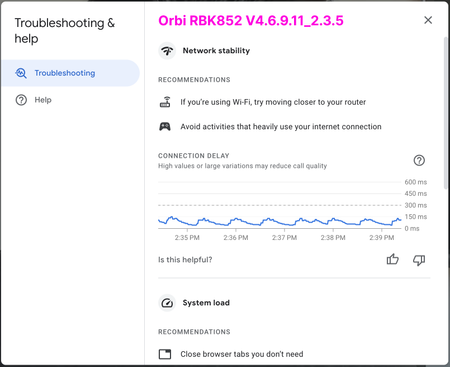
RBK852 is giving me high latency/delays during video conference (coming from Google Wi-Fi)
I recently switched to an RBK852 system from Google Wi-Fi because of various speed and coverage issues. The Orbi system blew my mind: 3x speed improvement, full coverage, fewer satellites. Everythin...

FURRYe38
Sep 28, 2022Guru - Experienced User
What is the Mfr and model# of the Internet Service Providers modem/ONT the NG router is connected too?
Be sure your using a good quality LAN cable between the modem and router. CAT6 is recommended.
Is this over a wired or wireless connection with this graph? Run a comparison graph to compare wired vs wireless.
What is the size of your home? Sq Ft?
What is the distance between the router and 📡 satellite(s)? 30 feet or more is recommended in between RBR and RBS📡 to begin with depending upon building materials when wirelessly connected.
https://kb.netgear.com/31029/Where-should-I-place-my-Orbi-satellite 📡
What channels are you using? Auto? Try Auto and 48 on 5Ghz. Or try setting manual channel 1, 6 or 11 on 2.4Ghz and 40 to 48 channel on 5Ghz.
Any Wifi Neighbors near by? If so, how many?
 leoportSep 28, 2022Aspirant
- ISP is Comcast Business, using an ARRIS SB6141 as the modem
- Both of the graphs are wireless. When connected via ethernet using a 100ft wire into a switch, the graph is pretty much a straight line pinned to the bottom.
- In the graphs, the placement of the routers and laptop are in the exact same place. I made sure that the laptop was connected to router (not satellites) which has one wall and "full cabinet" in-between. Can't be more than 12 ft. House is from the 50's, thin wood walls. But also, i tried this with direct line of sight to the router and again with a satellite. I got the same graph.
- When it comes to settings, they are all default. Coexistence and WMM enabled, CTS/RTS is 64, Preamble on auto, transmit at 100%.
- 2.4Ghz channel is on Auto, 5GHz channel is on 48 (I don't think 5GHz has an auto option, right?)
- ➡️ I'll experiment with the channels (I'll see if I can mimic the Google Wi-Fi settings too). I definitely see other SSIDs, so I have neighbors with Wi-Fi. I need to find a good/simple Mac Wi-Fi monitor/analyzer tool to better understand which channels are crowded.
What get's me, however, is the predictability of the graph... every 45sec or so there is a bump/build-up in latency. It doesn't feel like random noise/congestion/connection-quality. And why everything else is better with Orbi, except this VC issue. That's why I was hoping for a "oh, yeah, that graph shows that you should [do this thing]" type of solution. One thing that I wish I could test with Orbi is setting a "priority device" like I can do with Google Wi-Fi, it may have helped in troubleshooting.
Google Wi-Fi also has explicit toggles to prioritize video conferencing and gaming. I'm guessing WMM is similar? But its a bit opaque about what it actually does.
Additional info if it helps: I have about 50 devices connected. A lot of IoT. Nest/Ring cams. Good mix of 2.4 and 5GHz.
- FURRYe38Sep 28, 2022Guru - Experienced User
leoport wrote:
- ISP is Comcast Business, using an ARRIS SB6141 as the modem
- Both of the graphs are wireless. When connected via ethernet using a 100ft wire into a switch, the graph is pretty much a straight line pinned to the bottom.
- In the graphs, the placement of the routers and laptop are in the exact same place. I made sure that the laptop was connected to router (not satellites) which has one wall and "full cabinet" in-between. Can't be more than 12 ft. House is from the 50's, thin wood walls. But also, i tried this with direct line of sight to the router and again with a satellite. I got the same graph. >What is the size of your home? Sq Ft?
What is the distance between the router and 📡 satellite(s)?
- When it comes to settings, they are all default. Coexistence and WMM enabled, CTS/RTS is 64, Preamble on auto, transmit at 100%.
- 2.4Ghz channel is on Auto, 5GHz channel is on 48 (I don't think 5GHz has an auto option, right? >Correct.)
- ➡️ I'll experiment with the channels (I'll see if I can mimic the Google Wi-Fi settings too). I definitely see other SSIDs, so I have neighbors with Wi-Fi. I need to find a good/simple Mac Wi-Fi monitor/analyzer tool to better understand which channels are crowded.
or inssider: https://www.metageek.com/inssider/
What get's me, however, is the predictability of the graph... every 45sec or so there is a bump/build-up in latency. It doesn't feel like random noise/congestion/connection-quality. And why everything else is better with Orbi, except this VC issue. That's why I was hoping for a "oh, yeah, that graph shows that you should [do this thing]" type of solution. One thing that I wish I could test with Orbi is setting a "priority device" like I can do with Google Wi-Fi, it may have helped in troubleshooting.
Google Wi-Fi also has explicit toggles to prioritize video conferencing and gaming. I'm guessing WMM is similar? But its a bit opaque about what it actually does. <WMM is QOS for wifi. Should keep this enabled.
Additional info if it helps: I have about 50 devices connected. A lot of IoT. Nest/Ring cams. Good mix of 2.4 and 5GHz.
What kind of IoT do you have? Any lights or switches?
- leoportSep 28, 2022Aspirant
- House is about 2000 sq ft. Big open atrium with windows in the center. The distance between the R and S is about 30ft.
- IoT has about 12 non-wifi hue lights (connected to a bridge wired into the switch). No outlet switches. 5 sonos speakers. A bunch of 5 google home speakers, a few nest hubs.
In the diagram below I show the two Orbi devices and where the Mac is. (but I tested in various areas with the same performance)
One thing I wonder is if other people have the same looking Google Meet graph and they don't have problems. (even if I see different graph results on Google Wi-Fi vs Orbi)