NETGEAR is aware of a growing number of phone and online scams. To learn how to stay safe click here.
Forum Discussion

leoport
Sep 28, 2022Aspirant
RBK852 is giving me high latency/delays during video conference (coming from Google Wi-Fi)
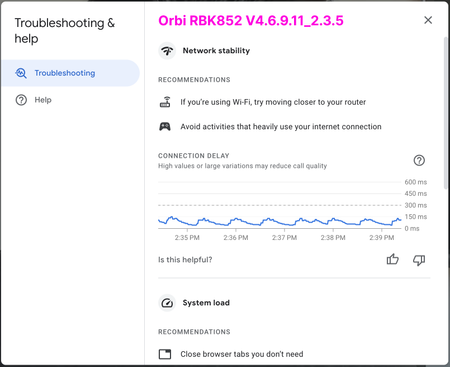
I recently switched to an RBK852 system from Google Wi-Fi because of various speed and coverage issues. The Orbi system blew my mind: 3x speed improvement, full coverage, fewer satellites. Everythin...

FURRYe38
Sep 28, 2022Guru - Experienced User
What is the Mfr and model# of the Internet Service Providers modem/ONT the NG router is connected too?
Be sure your using a good quality LAN cable between the modem and router. CAT6 is recommended.
Is this over a wired or wireless connection with this graph? Run a comparison graph to compare wired vs wireless.
What is the size of your home? Sq Ft?
What is the distance between the router and 📡 satellite(s)? 30 feet or more is recommended in between RBR and RBS📡 to begin with depending upon building materials when wirelessly connected.
https://kb.netgear.com/31029/Where-should-I-place-my-Orbi-satellite 📡
What channels are you using? Auto? Try Auto and 48 on 5Ghz. Or try setting manual channel 1, 6 or 11 on 2.4Ghz and 40 to 48 channel on 5Ghz.
Any Wifi Neighbors near by? If so, how many?

leoport
Sep 28, 2022Aspirant
- ISP is Comcast Business, using an ARRIS SB6141 as the modem
- Both of the graphs are wireless. When connected via ethernet using a 100ft wire into a switch, the graph is pretty much a straight line pinned to the bottom.
- In the graphs, the placement of the routers and laptop are in the exact same place. I made sure that the laptop was connected to router (not satellites) which has one wall and "full cabinet" in-between. Can't be more than 12 ft. House is from the 50's, thin wood walls. But also, i tried this with direct line of sight to the router and again with a satellite. I got the same graph.
- When it comes to settings, they are all default. Coexistence and WMM enabled, CTS/RTS is 64, Preamble on auto, transmit at 100%.
- 2.4Ghz channel is on Auto, 5GHz channel is on 48 (I don't think 5GHz has an auto option, right?)
- ➡️ I'll experiment with the channels (I'll see if I can mimic the Google Wi-Fi settings too). I definitely see other SSIDs, so I have neighbors with Wi-Fi. I need to find a good/simple Mac Wi-Fi monitor/analyzer tool to better understand which channels are crowded.
What get's me, however, is the predictability of the graph... every 45sec or so there is a bump/build-up in latency. It doesn't feel like random noise/congestion/connection-quality. And why everything else is better with Orbi, except this VC issue. That's why I was hoping for a "oh, yeah, that graph shows that you should [do this thing]" type of solution. One thing that I wish I could test with Orbi is setting a "priority device" like I can do with Google Wi-Fi, it may have helped in troubleshooting.
Google Wi-Fi also has explicit toggles to prioritize video conferencing and gaming. I'm guessing WMM is similar? But its a bit opaque about what it actually does.
Additional info if it helps: I have about 50 devices connected. A lot of IoT. Nest/Ring cams. Good mix of 2.4 and 5GHz.
- FURRYe38Sep 28, 2022Guru - Experienced User
leoport wrote:
- ISP is Comcast Business, using an ARRIS SB6141 as the modem
- Both of the graphs are wireless. When connected via ethernet using a 100ft wire into a switch, the graph is pretty much a straight line pinned to the bottom.
- In the graphs, the placement of the routers and laptop are in the exact same place. I made sure that the laptop was connected to router (not satellites) which has one wall and "full cabinet" in-between. Can't be more than 12 ft. House is from the 50's, thin wood walls. But also, i tried this with direct line of sight to the router and again with a satellite. I got the same graph. >What is the size of your home? Sq Ft?
What is the distance between the router and 📡 satellite(s)?
- When it comes to settings, they are all default. Coexistence and WMM enabled, CTS/RTS is 64, Preamble on auto, transmit at 100%.
- 2.4Ghz channel is on Auto, 5GHz channel is on 48 (I don't think 5GHz has an auto option, right? >Correct.)
- ➡️ I'll experiment with the channels (I'll see if I can mimic the Google Wi-Fi settings too). I definitely see other SSIDs, so I have neighbors with Wi-Fi. I need to find a good/simple Mac Wi-Fi monitor/analyzer tool to better understand which channels are crowded.
or inssider: https://www.metageek.com/inssider/
What get's me, however, is the predictability of the graph... every 45sec or so there is a bump/build-up in latency. It doesn't feel like random noise/congestion/connection-quality. And why everything else is better with Orbi, except this VC issue. That's why I was hoping for a "oh, yeah, that graph shows that you should [do this thing]" type of solution. One thing that I wish I could test with Orbi is setting a "priority device" like I can do with Google Wi-Fi, it may have helped in troubleshooting.
Google Wi-Fi also has explicit toggles to prioritize video conferencing and gaming. I'm guessing WMM is similar? But its a bit opaque about what it actually does. <WMM is QOS for wifi. Should keep this enabled.
Additional info if it helps: I have about 50 devices connected. A lot of IoT. Nest/Ring cams. Good mix of 2.4 and 5GHz.
What kind of IoT do you have? Any lights or switches?
- leoportSep 28, 2022Aspirant
- House is about 2000 sq ft. Big open atrium with windows in the center. The distance between the R and S is about 30ft.
- IoT has about 12 non-wifi hue lights (connected to a bridge wired into the switch). No outlet switches. 5 sonos speakers. A bunch of 5 google home speakers, a few nest hubs.
In the diagram below I show the two Orbi devices and where the Mac is. (but I tested in various areas with the same performance)
One thing I wonder is if other people have the same looking Google Meet graph and they don't have problems. (even if I see different graph results on Google Wi-Fi vs Orbi)
- FURRYe38Sep 28, 2022Guru - Experienced User
I would try this to test. Change the SSID name or change the PW to something different so that it disconnects all wireless from the system. Turn OFF the RBS. With the one wireless PC check your app again.
For that size of home and distance, I would turn down the power transmit on the RBR from 100% to 50% as well. Under Advanced Tab/Advanced Settings/Wireless Settings