NETGEAR is aware of a growing number of phone and online scams. To learn how to stay safe click here.
Forum Discussion

leoport
Sep 28, 2022Aspirant
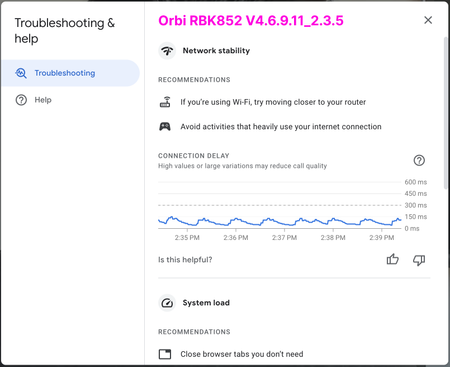
RBK852 is giving me high latency/delays during video conference (coming from Google Wi-Fi)
I recently switched to an RBK852 system from Google Wi-Fi because of various speed and coverage issues. The Orbi system blew my mind: 3x speed improvement, full coverage, fewer satellites. Everythin...

FarmerBob1
Sep 28, 2022Luminary
leoport I have read through your "excellently presented" information, replies and a couple things caught my eye. Lots of variables.
Love your car in the garage!
First, your Arris SB6141 Cable Modem is not only a bit dated, but has the Intel PUMA 5 Broadband Modem Chipset. Of which the PUMA 5 - 7 chip families were/are plagued with performance issues that causes(d) severe latency. I have several SB6190's that have the PUMA 6 chipsets that caused me major problems with VoIP Services and Latency. Bookends that I can't resell. Here is a link to a "The Register", out of England, article explaining the PUMA 5-7 Issue:
https://www.theregister.com/2017/08/09/intel_puma_modem_woes/
I have a 2010 MBP running 10.14.6, have read many reviews of various performance issues with the newer macOSs and I'm comfy, with the ORBI RBK853 connected to a Calix 716 ONT Fiber converter with a ~940Mbps connection. And even with that I always connect my laptop to a Cat7 hardwire that is off a 5 port Gigabit Hub that is fed by a 50' Cat8 Trunk directly plugged into the RBR and have had no issues. Lately helping friends figure out an Ooma issue, they were using it wirelessly, I found out that the process of WiFi doesn't work well for VoIP. I would imagine that Teleconferencing would be about the same. Although I haven't used Google Meetings, but Zoom and Skype and they have been perfect. Also your testing being through a browser introduces "overhead" that doesn't help in accurate readings. I have also been using Zoom for TeleMed appts for a very long time wirelessly with no issues either. But then I have had providers that are on huge high-end Networks and their end is horrible.
From what it sounds like you have "Some Traffic", Obstructions and are kinda pushing things to an extreme with the "100' wire" and trying to stretch things out. I use nothing less than Cat7 anymore and try to keep things within a logical range.
I would recommend trying this, along with what FURRYe38 has posted, and see what happens:
- Advanced > Setup > Wireless: Turn on the AX Settings. And maybe turn them off to see what that does.
- Advanced > Advanced > Wireless Settings: Turn Off "Coexistence"; Leave WMM on; Change RTS/CTS to 2347 (or try 2346) for both 2.4 & 5.
- And for the time being treating VoIP and VCs like "Needy Spoiled Brats" that appeasing would be much easier than ignoring.
So after dinking around with all that let us know what you come up with and if there are still issues, we'll go from there. You're like me, lots of "stuff" going on and one thing that you'd never expect to have any problems with . . . ya do! Sometimes my WiFi Lights make me nutz when they can't "phone home to the Mothership". They blink at 100% until they can talk to "Mom". Not really a great thing at 4am.
Hope this helps. I'll be watching . . .
. . . sO

CrimpOn
Sep 28, 2022Guru - Experienced User
FarmerBob1 wrote:
First, your Arris SB6141 Cable Modem is not only a bit dated, but has the Intel PUMA 5 Broadband Modem Chipset. Of which the PUMA 5 - 7 chip families were/are plagued with performance issues that causes(d) severe latency.
Although this modem may be outdated, I struggle to understand how:
- The same MacBook.
- Running the same Google Meet diagnostics
Will show such a dramatic difference in latency between the Google WiFi and Netgear WiFi when they are both connected to the same modem. I would think if the modem cannot handle the traffic, then it cannot handle the traffic for any router that is connected to it.
When the laptop is connected to the router using Ethernet cable, then there is almost zero latency. The only difference appears to be the WiFi connection between router and Macbook.