NETGEAR is aware of a growing number of phone and online scams. To learn how to stay safe click here.
Forum Discussion

tbpate
Apr 11, 2024Aspirant
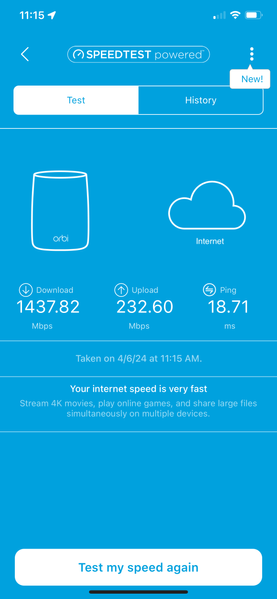
RBKE963 LAN Ports seem to be bottle necked at the Router
My Current Setup: Comcast XB8 Gateway (1.5 Gig Service) RBRE960 Router (AXE11000) connected to gateway via Cat6 patch cable with Cat6 connectors Firmware: v6.3.7.10 RBSE960 Satellites (3) tw...

FURRYe38
Apr 11, 2024Guru - Experienced User
Tried a different PC connected to the back of the RBR to compare speed results?
How are you speed testing? Ooklas installable speed test app is recommended.
CAT6A STP cabling is recommended between the ISP modem and RBR.
Try disabling the following and see:
Armor, Smart Parental Controls or Circle, Traffic Meter.
What mode is the ISP modem in? Your ISP Modem is a gateway thus has a built in router and wifi.
This would be a double NAT (two router) condition which isn't recommended. https://kb.netgear.com/30186/What-is-Double-NAT
https://kb.netgear.com/30187/How-to-fix-issues-with-Double-NAT
Couple of options,
1. Configure the modem for transparent bridge or modem only mode. Then use the Orbi router in router mode. You'll need to contact the ISP for help and information in regards to the modem being bridged correctly.
2. If you can't bridge the modem, disable ALL wifi radios on the modem, configure the modems DMZ/ExposedHost or IP Pass-Through for the IP address the Orbi router gets from the modem. Then you can use the Orbi router in Router mode.
3. Or disable all wifi radios on the modem and connect the Orbi router to the modem, configure AP mode on the Orbi router. https://kb.netgear.com/31218/How-do-I-configure-my-Orbi-router-to-act-as-an-access-point and https://www.youtube.com/watch?v=H7LOcJ8GdDo&app=desktop
Try option #2 first...
Also your system is behind on FW as well:
- tbpateApr 11, 2024Aspirant
Thank you for the prompt response FURRYe38,
Just when I thought I was being thorough, you point out some pretty obvious information I should have included. My apologies for not including...
- Gateway is in Bridge Mode, which I had done prior to install of the mesh. I wanted the Orbi to do all the network routing, and I didn't want a double NAT issue.
- Armor, Smart Parental Controls/Circle, and Traffic Meter have all been disabled since the point of install.
Response to your suggestions:
- I will absolutely switch to CAT6a STP if needed, but a 3' CAT6 patch should be able to handle 1.5 Gig with ease, no? I'm using an Atolla USB-C to Ethernet adapter (C105) capable of 1 Gig, so I would expect close to a 1 Gig when testing... or am I mistaken?!
- I do have a windows laptop I can conduct a similar test with, so I will try that as well.
- The FW issue is very interesting to me, because when I search for updates via the app, it tells me its up to date:
However, I can clearly see that there is another FW update available via the link you sent me. I will look to see if I can manually update the FW and report back. Thank you for that information and links!
- FURRYe38Apr 11, 2024Guru - Experienced User
How are you speed testing?
Ooklas installable speed test app is recommended.
Be aware of what others are seeing with these ISP modems and Orbi systems:
- tbpateApr 11, 2024Aspirant
Yes... always Ookla.
Thank you for the additional information
- schumakuApr 11, 2024Guru - Experienced User
tbpate wrote:
- I will absolutely switch to CAT6a STP if needed, but a 3' CAT6 patch should be able to handle 1.5 Gig with ease, no? I'm using an Atolla USB-C to Ethernet adapter (C105) capable of 1 Gig, so I would expect close to a 1 Gig when testing... or am I mistaken?!
Correct drivers permitting, leaving alone certain early chip sets could show certain error (operating one of these here for several years, without issues reported elsewhere), but of course, yes! Under ideal conditions (who ever has these?), WiFi backhaul could reach the similar if not higher data rates. By rule of thumb, Cat6 cables can reliably transmit data up to 55 meters (180 feet) at 2.5 Gb/s PHY link rates. Beyond of this distance, the signal quality may degrade, resulting in slower speeds or potential data loss, CRC errors and more.
- tbpateApr 11, 2024Aspirant
100% understand and agree.
I currently have a CAT6 running 100' for wired backhaul to an outbuilding. However, my testing at the router is on a 3' CAT6 directly to the computer. Once I can figure out why I'm getting low throughput on the ethernet ports, I will be able to better test my current cabling and adjust accordingly. I did have some slight concern about the distance with the CAT6, but I had it on-hand and thought it would be suffice. We shall see!
Appreciate the help!
- CrimpOnApr 11, 2024Guru - Experienced User
tbpate wrote:
I'm using an Atolla USB-C to Ethernet adapter (C105) capable of 1 Gig, so I would expect close to a 1 Gig when testing... or am I mistaken?!
Was this same setup used to measure the speed when it matched expectations? What happens when that Macbook with USB adapter is connected directly to the XB8 port using this adapter?
- tbpateApr 11, 2024Aspirant
Yes, I used the exact same environment when I went back a second time to test. When I originally tested directly from the XB8 Gateway (bridge mode), I was able to achieve Gig as well.

