NETGEAR is aware of a growing number of phone and online scams. To learn how to stay safe click here.
Forum Discussion

MK2022
Oct 06, 2024Aspirant
RBR / RBS750: devices preferably connect to 2.4 GHz network
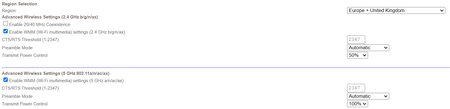
Configuration: RBR750 and RBS750 via ethernet backhaul; router mode Firmware: V7.2.6.31_5.0.24 I have 5 GHz capable modern (mobile) devices: when nearby the router or satellite; they connect to ...

FURRYe38
Oct 06, 2024Guru - Experienced User
Check first with the devices you have and make sure they are dual band supporting. Not all devices are dual band. Phones and Pads are mostly dual band. Most IoT devices maybe only 2.4Ghz.
NG came out with a separate IoT feature that you can have separate networks under the IoT SSID in v7 FW:
What is the Mfr and model# of the Internet Service Providers modem/ONT the NG router is connected too?
Be sure your using a good quality LAN cable between the modem and router. CAT6A STP is recommended.
How many RBS are deployed?
What is the size of your home? Sq Ft?
What is the distance between the router 📡 and satellite(s)🛰️? 30 feet or more is recommended in between RBR 📡 and RBS 🛰️ to begin with depending upon building materials when wired or wirelessly connected.
https://kb.netgear.com/31029/Where-should-I-place-my-Orbi-satellite 🛰
What channel configurations are currently set on the router.
Be sure to disable any MAC Address randomizers on phones and pads while at home:
https://community.netgear.com/t5/Orbi-App/NETGEAR-Mobile-Applications-and-Apple-Devices-FAQ/td-p/2220016/jump-to/first-unread-message
Try disabling the following and see:
Armor, Smart Parental Controls or Circle, Traffic Meter.
There are some known issues with v.31 FW. We can't recommend using it. If you seem to be experiencing issues, v.21 is most recommended and most stable: