NETGEAR is aware of a growing number of phone and online scams. To learn how to stay safe click here.
Forum Discussion

vonner04
Nov 18, 2023Aspirant
RBR350 powering RBR20 slow wifi when RBR350 is stored in garage metal panel box.
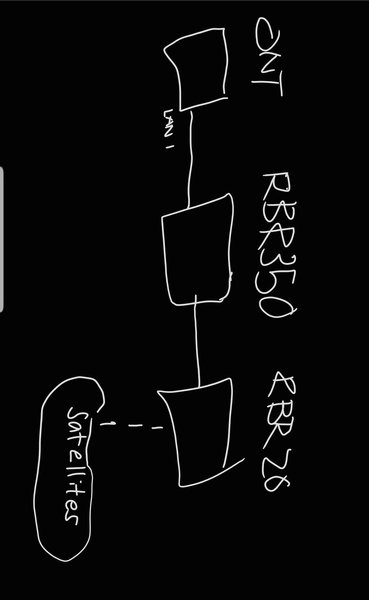
So RBR350 router is connected to the RBR20 router via ethernet. RBR350 is connected to LAN1 of the ONT box which provides the fibre connection. The issue I am having is that the WIFI provided by RBR2...

CrimpOn
Nov 18, 2023Guru - Experienced User
vonner04 wrote:
The issue I am having is that the WIFI provided by RBR20 router slows down when the RBR350 router is placed in the garage metal panel box. How can I fix this?
I agree. If the RBR20 is connected by Ethernet cable to (anything), then the WiFi network should not be affected by the physical placement of whatever the RBR20 is connected to.
It would be helpful to know more about "garage metal panel box" (sort of ambiguous).
vonner04
Nov 19, 2023Aspirant
Got you here is a photo. The RBR350 is basically connected to the ONT box via the red marked ethernet wire. Right now the RBR350 is inside this metal panel box so that it can connect to my PC. Note that in the provided photo the black marked ethernet wire is basically doing nothing as only LAN 1 is active.
I tried making RBR350 into AP mode but it doesn't work as it doesn't provide internet to the RBR20 router with 3 satellites connected.
- michaelkenwardNov 19, 2023Guru - Experienced User
vonner04 wrote:
Right now the RBR350 is inside this metal panel box so that it can connect to my PC.
Putting a wifi source inside a metal box is a great way of killing any wifi signal.
It acts like a "Faraday cage".
Why not run a longer cable to the RBR350 and put it outside the cage?
You hit the nail on the head in your first message.
Could this issue be double NAT?
Yes. To avoid that, if you have an an RBR20 and an RBR350 on the same network, the one not connected to the ONT should be in AP mode.
You could also turn off the wifi from the thing in the cage. It will just get in the way.
- vonner04Nov 19, 2023Aspirant
Sweet. Yes I am planning to turn off the wifi feature from the RBR350 router.
But it baffles me that the WIFI provided by the RBR20 router also slows down if the RBR350 router is inside the metal panel box despite being connected via ethernet connection.
If I do turn the RBR20 Router into AP mode would this affect the connection or performance of the satellites (RBS20 and RBS50) connected to the RBR20 router? Or will the performance remain the same?- michaelkenwardNov 19, 2023Guru - Experienced User
vonner04 wrote:
But it baffles me that the WIFI provided by the RBR20 router also slows down if the RBR350 router is inside the metal panel box despite being connected via ethernet connection.
You have two routers on your network. They are both sending out wifi. How the heck do they know what they are supposed to do when the routers are confused as to who is in charge?
A first experiment would be to disable the wifi on the router in the cage. Do you still see this slowdown?
But I'd just restore sanity by putting the downstream router into AP mode.
But if the second router is wired to the first, what is the caged one there for? Just to feed the PC? Bit of a wonky setup.
A more logical layout might make sense. It seems to be all over the place simply to wire a PC.
If I do turn the RBR20 Router into AP mode would this affect the connection or performance of the satellites (RBS20 and RBS50) connected to the RBR20 router? Or will the performance remain the same?It should be OK, but who knows with that convoluted layout?
I'd ditch the caged router altogether, which seems to be there just to operate as switch, and invest in Powerline Ethernet, or some cables, to feed the PC.
- CrimpOnNov 19, 2023Guru - Experienced User
I was expecting the photo to show
- The Orbi RBR350
- A patch panel of Ethernet cables running to locations in the house
- Probably an Ethernet switch
Are those items also in this enclosure?
