NETGEAR is aware of a growing number of phone and online scams. To learn how to stay safe click here.
Forum Discussion

abright
Jul 23, 2024Aspirant
RBR760 Port Forwarding Port 4500
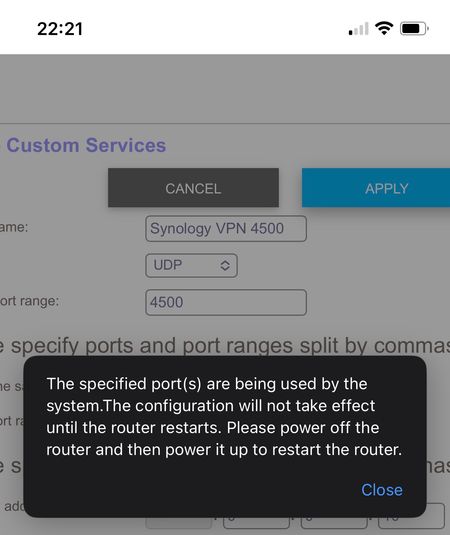
I’ve been struggling with this issue for weeks, and have made no progress, so hopefully someone can help. My network setup is a BT ONT feeding FTTP, with an Orbi RBR760 connected to the ONT as a ...

FURRYe38
Jul 26, 2024Guru - Experienced User
Will check and see. Not at home right now. Will see if others can check too.
I see your 750 doesn't have this problem.
Possible this wasn't a design/bug issue in 750 series onwards.
The 350 series was entry level hardware so not a lot of features would have been included I presume. Something got left out or caused this bug only on the 350 series that got past.
FURRYe38
Jul 26, 2024Guru - Experienced User
- abrightJul 26, 2024AspirantI assume the 960 isn’t built off the same base as the 760?
- FURRYe38Jul 26, 2024Guru - Experienced User
No.
- CrimpOnJul 26, 2024Guru - Experienced User
As the first Orbi product to support WiFi6E (the 6Ghz frequency band), the 960 is clearly build around different WiFi radio chips. The WiFi5 RBR50 and the WiFi6 RBR750 utilized the previous generation of Qualcomm chips
NAT and Port Forwarding have nothing to do with the WiFi side of the product. The evidence appears to be building up that WiFi5, WiFi6, and WiFi6E Orbi routers support forwarding port 4500. (Maybe someone with a WiFi7 Orbi can test forwarding port 4500 on it?)
What is different about the 760 is that rather than use 4x4 MIMO for the 5G backhaul WiFi link, Netgear "cheaped out" and used only 2x2 MIMO. Saved a few bucks.
https://fccid.io/PY321100530/Internal-Photos/Internal-Photos-ver-2-5564899
In terms of solutions to the issue of connecting devices on the internet to web servers on the LAN, purchasing another router and changing the RBR760 from router to access point (AP) mode would not be my first choice:
- Use the OpenVPN Host built into the Orbi router (free)
- Forward individual ports to each of the LAN web servers (free) for example:
- External port 1441 to port 443 on server 1
- External port 1442 to port 443 on server 2
- External port 1443 to port 443 on server 3
- Implement OpenVPN Host on the Synology NAS (free)
- Implement Wireguard Host on the Synology NAS (free)
https://www.blackvoid.club/wireguard-vpn-for-your-synology-nas/ - Spend $80 (plus tax) on one of those MT-2500 appliances, which also provides a VPN Client feature.
It is damned annoying that forwarding UDP port 4500 does not appear to work with the RBR760, but that solution appears to be blocked because:
- It would cost more to get a support contract with Netgear than to buy a solution, and
- Netgear support appears to repudiate that port 4500 can be forwarded, even though we have at least three Orbi systems that are able to forward port 4500.
- abrightAug 17, 2024AspirantI have finally gotten round to trying a different router (one I had at home rather than buying one) and using the Orbi in AP mode.
This worked to enable me to connect to the VPN, but the Orbi says it’s not connected to the internet (even though it clearly is) and the WiFi drops out every minute or so.
I’m not sure if these two are connected or if something else is causing the WiFi to drop out.
Any advice? - FURRYe38Aug 17, 2024Guru - Experienced User
Be sure wifi radios are disabled on the older router.
What is the brand and model# of the older router?
Try setting up a static IP address configuration on the RBR for AP mode:
