NETGEAR is aware of a growing number of phone and online scams. To learn how to stay safe click here.
Forum Discussion

4nthony
Aug 26, 2021Aspirant
RBR850 - DNS Options are Disabled (FW 4.6.3.9)
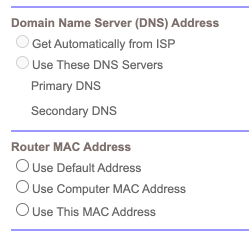
I updated to firmware V4.6.3.9_2.0.50 today. First thing I noticed was my DNS settings were gone and the radio buttons in the GUI were disabled: The text boxes for IP address input are enab...

FURRYe38
Aug 26, 2021Guru - Experienced User
What happens if you disable SPC? Usually SPC features uses there own DNS and disables any custom user inputs when SPC is enabled.
- 4nthonyAug 26, 2021Aspirant
I'm looking through the app and I can't figure out where to disable Parental Controls.
Can you point me in the right direction?
- FURRYe38Aug 26, 2021Guru - Experienced User
Try this, Obi app.
Select the House icon upper left corner.Select Settings.
Select Parental Control
Select the slider button to disable PC...
This work?
- 4nthonyAug 26, 2021Aspirant
Thanks, I found the setting. I always forget Orbi puts some settings in that area.
As for the DNS settings, they are still disabled even though Parental Controls are also disabled.
However, I found a workaround. If I go into the browser developer tools, I can delete the "disabled" attribute on the radio button, fill in the IP addresses, and submit the form. The IPs will persist as long as I don't make any other changes on that page. Weird.
Maybe I'll do a reset of the router tomorrow and see if that helps.