NETGEAR is aware of a growing number of phone and online scams. To learn how to stay safe click here.
Forum Discussion

4nthony
Aug 26, 2021Aspirant
RBR850 - DNS Options are Disabled (FW 4.6.3.9)
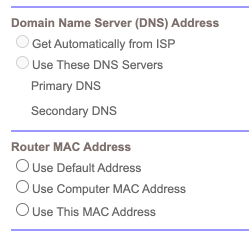
I updated to firmware V4.6.3.9_2.0.50 today. First thing I noticed was my DNS settings were gone and the radio buttons in the GUI were disabled: The text boxes for IP address input are enab...

FURRYe38
Aug 26, 2021Guru - Experienced User
What happens if you disable SPC? Usually SPC features uses there own DNS and disables any custom user inputs when SPC is enabled.
4nthony
Aug 26, 2021Aspirant
I'm looking through the app and I can't figure out where to disable Parental Controls.
Can you point me in the right direction?
- FURRYe38Aug 26, 2021Guru - Experienced User
Try this, Obi app.
Select the House icon upper left corner.Select Settings.
Select Parental Control
Select the slider button to disable PC...
This work?
- 4nthonyAug 26, 2021Aspirant
Thanks, I found the setting. I always forget Orbi puts some settings in that area.
As for the DNS settings, they are still disabled even though Parental Controls are also disabled.
However, I found a workaround. If I go into the browser developer tools, I can delete the "disabled" attribute on the radio button, fill in the IP addresses, and submit the form. The IPs will persist as long as I don't make any other changes on that page. Weird.
Maybe I'll do a reset of the router tomorrow and see if that helps.
- FURRYe38Aug 27, 2021Guru - Experienced User
Ok, ya, Seems like a factory reset maybe needed.
I would post about this also over here and lets see if we can get some more information on this:
https://community.netgear.com/t5/NETGEAR-Smart-Home-Parental/bd-p/en-home-smart-parental-controls