NETGEAR is aware of a growing number of phone and online scams. To learn how to stay safe click here.
Forum Discussion

OrbiOrNot
Mar 21, 2024Initiate
RBR850 / RBS850 Firmware V7.2.6.21 Unstable (Slow or disconnected connection)
My setup: 1 RBR850 Router 3 RBS850 Satellites. Edgerouter V4 router for the house CAT6E cabling from router to RBR and to 2 RBS's for wired backhaul. All have a home run connection to my router. ...

CrimpOn
Mar 21, 2024Guru - Experienced User
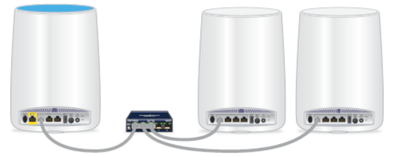
I see the root of this problem being the router is not connected to the internet through the WAN port. The first post shows a "stock picture" from Netgear on how to connect satellites to a router using an Ethernet switch. What is does not show is that the router must also be connected to the internet using the WAN port.
That black box is an Ethernet switch. It is not the primary router (Edgerouter in this case).
The network may appear to be working, because the Ethernet switches in each unit use Address Resolution Protocol (ARP) to discover which switch port is used to communicate with devices on the network. But the Orbi router is not designed to have both the internet and satellites appear on the LAN side of the router.
If the WAN port is connected to the Edgerouter, one router LAN port and the satellite LAN ports connected to a simple switch, the network will work correctly.
Users sometimes get into this situation because they do not want to locate the Orbi router next to their primary router (Edgerouter). With only a single Ethernet cable running from the primary router location to various rooms, they face a problem. (Need two cables. Have one cable. oh, dear.)