NETGEAR is aware of a growing number of phone and online scams. To learn how to stay safe click here.
Forum Discussion

TheStigh
Jan 13, 2023Tutor
RBR850 and issue with combinated wifi/wired backhaul
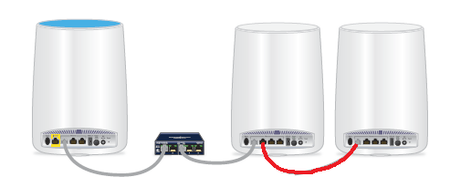
Hi all, Just installed a new 850 kit w/1 * RBR850 and 2 * RBS 850's. RBR are connected to the Cisco Gb switch RBS #1 are connected to the Cisco Gb switch RBS #2 are with wireless only place...

plemans
Jan 13, 2023Guru - Experienced User
1. the RBS have their own internal algorithm that determines which to connect to. Because going through a satellite might add latency and slow a satellite down a little bit, even though its further, the RBS might be connecting to the RBR. I don't know what their internal algorithm is. I just know sometimes they connect it unexpected ways
2. you can daisy chain the satellites how you pictured.
TheStigh
Jan 13, 2023Tutor
Hi plemans,
Thank you for your quick reply.
Are you saying that we CAN expect issues where RBS #2 only connects wirelessly to RBS #1?
Our testing last night was working, suddenly stopped for a while, then re-connected.
/Stigh