NETGEAR is aware of a growing number of phone and online scams. To learn how to stay safe click here.
Forum Discussion

kskreider
Apr 14, 2024Aspirant
RBR850 blocking certain websites
Hi, fellow Orbians! I had an older Orbi system (AX4200) and was gifted this RBR850 (AX6000) kit. It was fully installed and going about our business until I wanted to source parts to build a chic...
- Apr 16, 2024
Amazing how people don't want to listen.
Worth reading:
Potentially related:
- Why is Akamai Blocking Me? Part 2 - Penetration Testers, Bug Bounty Hunters and Security Researchers
- Why is Akamai Blocking Me? Part 3 – Partners Performing Web Scraping Activity
Part 2 should be easy to answer (unless the recent user which got the same public IP address triggered this)
Part 3 might be caused by malware or similar.
You won't get anywhere wasting Comcast/Xfinity helpdesk resources.


FURRYe38
Apr 14, 2024Guru - Experienced User
Need the cable connections data page as well.
Please repost a event log too as to see if any more events are seen.
Any Criticals, Errors or Warnings seen in the event logs needs to be reviewed and resolved by the ISP. Indicates a signal issue on the ISP line up to the modem.
IF you can get to the problemactic sites, then seem to be something on the RBR thats is blocking something. Lets check the modems cable connections data first.
Be sure that you reset the RBR and Setup from scratch:
use the ERASE button on the routers web page to factory reset the router:
https://kb.netgear.com/000062081/How-do-I-erase-the-configuration-settings-on-my-Orbi-WiFi-System
Walk thru the setup routine with a wired PC:
https://kb.netgear.com/22697/How-do-I-install-my-NETGEAR-router-using-the-router-web-interface
Can follow this process as well:
Be sure to not use Orbi app and Don't enable any Armor, Smart Parental controls or Traffic Meter for now.
kskreider
Apr 14, 2024Aspirant
I keep posting logs and the replies are disappearing. I have pasted them into a pdf and attached them instead.
- FURRYe38Apr 15, 2024Guru - Experienced User
Ok, cable connections page looks good.
However, still event logs show critical. Any Criticals, Errors or Warnings seen in the event logs needs to be reviewed and resolved by the ISP. Indicates a signal issue on the ISP line up to the modem.
After you factory reset and setup from scratch, Try inputting some custom DNS addresses in on the RBRs web page under Advanced Tab/Setup/Internet. Try Cloudfare or Quad9 addresses here.
- kskreiderApr 16, 2024Aspirant
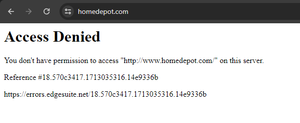
OK, update. The full reset seemed to work well. Everything was fine last night and up until about a half hour ago using Google DNS. I tried Tractor Supply website and got the same edgesuite.net error again. Home Depot works fine though. I switched to Cloudfare and no go. I turned my VPN on and dammit it works fine.
What is the problem with this thing? Do you really think that random sites are blocking Orbi because of critical errors coming from the line up to the modem? This is kind of absurd for how much this setup costs. Is this common? should I return it and just go back to my old ax4200 system?
- schumakuApr 16, 2024Guru - Experienced User
kskreider wrote:
OK, update. The full reset seemed to work well. Everything was fine last night and up until about a half hour ago using Google DNS. I tried Tractor Supply website and got the same edgesuite.net error again. Home Depot works fine though. I switched to Cloudfare and no go. I turned my VPN on and dammit it works fine.
What is the problem with this thing? Do you really think that random sites are blocking Orbi because of critical errors coming from the line up to the modem? This is kind of absurd for how much this setup costs. Is this common? should I return it and just go back to my old ax4200 system?
Wrong question, Sir! You still don't want to understand these messages are coming on your working Internet connection - from the Akamai CDN front-end - in reply to a connection attempt to a Web server - neither from the your your cable modem nor from your RBR850?
Randomly changing the DNS servers you are querying don't make much difference.
Your VPN connection is using the same cable modem, the same router, the same Internet connection, isn't it? With the VPN enabled, the Akamai CDN does no longer "see" a direct connection from your Internet address (IPv4 or IPv6), thus - whatever is blocking your access attempts there - the connection does succeed.