NETGEAR is aware of a growing number of phone and online scams. To learn how to stay safe click here.
Forum Discussion

kamran_
Sep 19, 2022Aspirant
RBR850 Network Drop and Internet Error: Not Connected
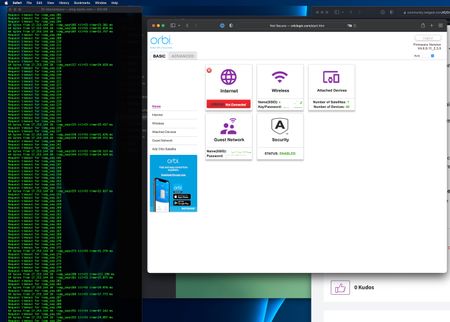
Hey all, First of all thank you for your time in reading my thread. I think I have an interesting one for you. Problem: A little while ago, feels like after the V4.6.9.11_2.3.5 update, I star...
kamran_
Sep 20, 2022Aspirant
Thanks for the suggestions. Disconnected, re-added and re-synced both satellites successfully. Same issue, ping is showing a ton of dropped packets. I felt like I ruled out the satellites when I turned them both off and issue was still happening.

FURRYe38
Sep 20, 2022Guru - Experienced User
So are you pinging a ISP IP address or something?
How are you pinging?
This is with ALL other devices disconnected from the RBR including the RBS and just a wired PC pinging?
Please edit out any ISP WAN IP addressed from screen captures.
Wondering if our RBR is fauly or someting on the ISP line.
Do you get some ping results with the PC connected directly to the Modem/ONT?
Do you happen to have a spare external router by chance?
Just ran ping test on my 8 series connected to a CAX80 in modem mode:
- kamran_Sep 20, 2022Aspirant
Hi FURRYe38. Thanks for your reply.
I'm pinging from my PC over WIFI. I covered some of your questions in the What I tried section above. However, when I put my PC right behind the router it pings fine. Once I go behind the Orbi speed tests are good but I'm seeing about 40% packet loss and then the eventual internet connection loss.
PING Command: ping apple.com
Result:
Kamrans-MacBook-Air ~ % ping apple.com PING apple.com (17.253.144.10): 56 data bytes Request timeout for icmp_seq 0 Request timeout for icmp_seq 1 Request timeout for icmp_seq 2 Request timeout for icmp_seq 3 Request timeout for icmp_seq 4 64 bytes from 17.253.144.10: icmp_seq=5 ttl=55 time=58.250 ms Request timeout for icmp_seq 6 Request timeout for icmp_seq 7 64 bytes from 17.253.144.10: icmp_seq=8 ttl=55 time=44.637 ms 64 bytes from 17.253.144.10: icmp_seq=9 ttl=55 time=93.531 ms Request timeout for icmp_seq 10 Request timeout for icmp_seq 11 Request timeout for icmp_seq 12 Request timeout for icmp_seq 13 ^C --- apple.com ping statistics --- 15 packets transmitted, 3 packets received, 80.0% packet loss round-trip min/avg/max/stddev = 44.637/65.473/93.531/20.604 ms kkazempour@Kamrans-MacBook-Air ~ %- FURRYe38Sep 20, 2022Guru - Experienced User
Try same ping using the PC with a wired connection?
How is the wifi configured on the RBR? Basic and Advanced settings please.
- kamran_Sep 20, 2022Aspirant
Basic is above and here is the advanced. I'm going to pick up my ethernet crap tomorrow and run a test.