NETGEAR is aware of a growing number of phone and online scams. To learn how to stay safe click here.
Forum Discussion

alternet
Mar 07, 2023Tutor
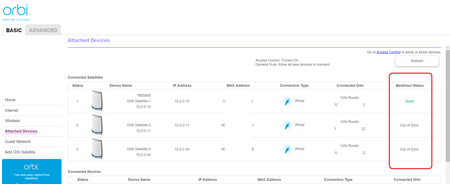
RBR850, RBS850, 2x RBS350 "Out of sync" & default "password"!!!
Hi all, I got RBR850 with RBS850 ....for a while everything worked well. After a while I had to add some more coverage to my system and got 2 additional satellites RBS350 (following compatibility...
alternet
Mar 09, 2023Tutor
The house is about 4800sq ft (450m2)
Each device is at least 30 ft (10m) away from each other. The router and one RBS350 are on the same level, about 40ft away from each other and there are very thick walls between them. The second RBS350 is positioned a floor above in the opposite corner corner of the house, and the RBS850 is placed at the attic also at the opposite corner (the distances are still above 30 ft to each other and always tick walls between them).
Structural LAN is 6A... cables connecting satellites CAT6.
YES - the RBR850 is directly connected to the modem via the yellow port and other ports are linked to the satellites via patch panels (3x) and one goes to the main switch.
YES. After restarts everything is syncing correctly for a while and after that it is out of sync. This morning all three RBS were Out of Sync. Now all 3 are in status "Good" - totally do not understand it!
YES. Factory reset performed twice since FW update (also tried to use RBR as an AP, but my modem is not easy to maintain).

FURRYe38
Mar 09, 2023Guru - Experienced User
Were the RBS first wirelessly synced to the RBR before connecting them via ethernet cable?
Did you first connect the RBS one at a time fully before turning on the next RBS to get it synced?
Possible bad connection on the LAN cable between the RBR and RBS could cause this.
- alternetMar 09, 2023Tutor
FURRYe38 wrote:Were the RBS first wirelessly synced to the RBR before connecting them via ethernet cable?
Yes
Did you first connect the RBS one at a time fully before turning on the next RBS to get it synced?
YES. One by one.
Possible bad connection on the LAN cable between the RBR and RBS could cause this.
CAT6 between RBR and patch panel, CAT6A structural LAN, CAT6 between the wall and RBS.... had some issues getting CAT7 or 8 😉
- FURRYe38Mar 09, 2023Guru - Experienced User
Possible that the connections or connectors or wall jacks could have some bad connections causing problems.
I presume if the RBS wirelessly connect and sync fine with out seeing the out of sync message, then when you go to ethernet connect them, this maybe what's causing the out of sync problem. The RBS are not properly getting synced over ethernet.
- alternetMar 09, 2023Tutor
Even standing next to each other being connected with 6A cable getting message Out of Sync after a while - the problem lays somewhere else and I have no an idea where 😞
Already started to regret buying it 😞