NETGEAR is aware of a growing number of phone and online scams. To learn how to stay safe click here.
Forum Discussion

alternet
Mar 07, 2023Tutor
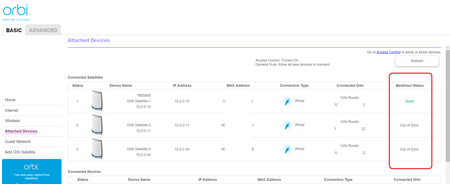
RBR850, RBS850, 2x RBS350 "Out of sync" & default "password"!!!
Hi all, I got RBR850 with RBS850 ....for a while everything worked well. After a while I had to add some more coverage to my system and got 2 additional satellites RBS350 (following compatibility...
iyang
Mar 15, 2023NETGEAR Expert
Hi alternet ,
Can you try to click "Advanced" --> "Firmware upgrade" page, and click "check" button?
You may see a new FW version, and suggest to upgrade RBS350 new FW.
Thanks.
- alternetMar 15, 2023Tutor
Tried from RBR:
...and from the RBS end it is not possible since only manual upgrade is possible:
- FURRYe38Mar 15, 2023Guru - Experienced User
Try sending the RBS FW file to the RBS web page?
- iyangMar 15, 2023NETGEAR Expert
Hi alternet ,
Can you try to download RBS350 FW v4.6.14.3 via https://www.netgear.com/support/product/rbk653#download ?
Thanks.
- alternetMar 16, 2023Tutor
iyang wrote:Can you try to download RBS350 FW v4.6.14.3 via https://www.netgear.com/support/product/rbk653#download ?
Hi iyang,
I have done it on both RBS350:
It seems it worked partially .... only for one RBS.
BTW: the upgrade procedure was exactly the same for both RBS. And the status of RBS 2 changed immediately after the upgrade ended, and the status of RBS 3 is out of sync since upgrade and when I am logging on it it shows "Your WIFI Orbi Satellite connection is up and running."
Now I am going to observe the other one and will let you know soon.
Just for your information - all is up to date:
The more I see the less I understand 😞
