NETGEAR is aware of a growing number of phone and online scams. To learn how to stay safe click here.
Forum Discussion

Caravan
Oct 27, 2024Aspirant
RBR850 slow
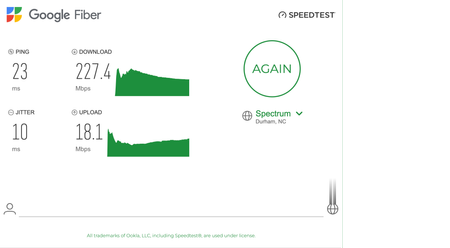
Hello, I have a 1 Gig internet connection. The connected devices have shown 200 to 300 Mbps for the past few days, and the internet has become very slow. I tried connecting the router with a ...

FURRYe38
Oct 28, 2024Guru - Experienced User
Is the first speed test with a wired PC connected directly to the ISP modem or ONT?
What is the Mfr and model# of the Internet Service Providers modem/ONT the NG router is connected too?
Be sure your using a good quality LAN cable between the modem and router. CAT6A STP is recommended.
How many RBS are deployed?
What is the size of your home? Sq Ft?
What is the distance between the router 📡 and satellite(s)🛰️? 30 feet or more is recommended in between RBR 📡 and RBS 🛰️ to begin with depending upon building materials when wired or wirelessly connected.
https://kb.netgear.com/31029/Where-should-I-place-my-Orbi-satellite 🛰
Does this happen with the RBS turned OFF?
Does this happen with both wireless and wired devices?
What channel configurations are currently set on the router?
Be sure to disable any MAC Address randomizers on phones and pads while at home:
https://community.netgear.com/t5/Orbi-App/NETGEAR-Mobile-Applications-and-Apple-Devices-FAQ/td-p/2220016/jump-to/first-unread-message
Try disabling the following and see:
Armor, Smart Parental Controls or Circle, Traffic Meter.
Has a power off for 1 minute then back ON with the ISP modem and router and satellites been performed since last update?
Be sure to restart your network in this sequence:
Turn off and unplug modem.
Turn off router and computers.
Plug in and turn on modem. Wait 2 minutes for it to connect.
Turn on the router and wait 2 minutes for it to connect.
Turn on computers and rest of network.
Has a factory reset and setup from scratch been performed since last FW update?