NETGEAR is aware of a growing number of phone and online scams. To learn how to stay safe click here.
Forum Discussion

BartNG
Aug 24, 2021Aspirant
RBR850 slowed down after 4.6.3.9 firmware. unable to revert to 3.2.18.1_1.4.14 firmware
Recently did a manual firmware update for the RBR850 and RBS850 to version 4.6.3.9 because of the security related fixes. Somehow internet seems a lot slower since. 1-2 min interrupts are most notic...
- Aug 24, 2021
Perform a full factory reset on both router and satellite(s) then set up from scratch.
Disable AX mode on the RBR.
Set CTS to 2347 on the RBR.
Speed test with a wired PC and Ooklas installable speed test app to check speeds.
What is the Mfr and model# of the Internet Service Providers modem/ONT the NG router is connected too?
BartNG wrote:
Recently did a manual firmware update for the RBR850 and RBS850 to version 4.6.3.9 because of the security related fixes.
Somehow internet seems a lot slower since. 1-2 min interrupts are most noticable with streaming apps Netflix, Amazon Prime, Disney+ etc.
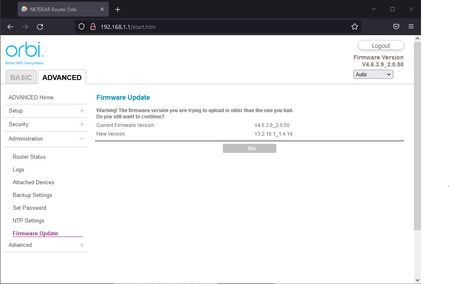
Trying to do a manual revert back to the previous 3.2.18.1_1.4.14 firmware but that gives a page with:
Firmware Update
Warning! The firmware version you are trying to upload is older than the one you had.
Do you still want to continue?
Current Firmware Version V4.6.3.9_2.0.50
New Version V3.2.18.1_1.4.14With only a "No" button
screenshot
Happens in several browser so unable to revert back :(
Anyone having the same problems?
BartNG
Aug 24, 2021Aspirant
Thanks, my wife needs to work from home the next few days. Will probably make your suggested changes in the upcoming weekend to be safe.
The ISP router is a UBEE EVW321B in bridge mode connected straight to the rbr850
The ISP router is a UBEE EVW321B in bridge mode connected straight to the rbr850

FURRYe38
Aug 24, 2021Guru - Experienced User
Ok, thanks for the feedback.
One item that is known is that the speed test results on v4 is inaccurate when using the Orbi app and onboard RBR speed test app. Speeds seen thru a wired PC and speed test app on PC should report accurate speed results.
Keep us posted.
- BartNGAug 26, 2021Aspirant
Hi, did the factory reset today and seems all performance problems are solved. Thanks!
Would you suggest a reset after every firmware update?
- FURRYe38Aug 26, 2021Guru - Experienced User
Normally FW resets aren't needed, just a power OFF of the RBR and RBS. However, in some cases a factory reset is a good thing when odd issues crop up.
Glad the reset worked for you.
Be sure to save off a back up configuration to file for safe keeping. Saves time if a reset is needed.
https://kb.netgear.com/000062080/How-do-I-back-up-the-configuration-settings-on-my-Orbi-WiFi-System
Enjoy. 📡 - FarmerBob1Sep 01, 2021Luminary
Personally, I would recommend at least a "Pin-Hole Reset" prior to, but after a Back-Up, and after the installtion of the new FW. Then reentering the set-up info from scratch, then Power Cycling the unit.
Seems a little rash, but look at the problems happening and what we're doing to fix them. Just about all that. I use to do 30-30-30 resets before and after until it was widely discussed that it was no longer needed with the newer tech. BUT, I have had to do a couple of them lately to clean things up and fix problems I was having.
