NETGEAR is aware of a growing number of phone and online scams. To learn how to stay safe click here.
Forum Discussion

BartNG
Aug 24, 2021Aspirant
RBR850 slowed down after 4.6.3.9 firmware. unable to revert to 3.2.18.1_1.4.14 firmware
Recently did a manual firmware update for the RBR850 and RBS850 to version 4.6.3.9 because of the security related fixes. Somehow internet seems a lot slower since. 1-2 min interrupts are most notic...
- Aug 24, 2021
Perform a full factory reset on both router and satellite(s) then set up from scratch.
Disable AX mode on the RBR.
Set CTS to 2347 on the RBR.
Speed test with a wired PC and Ooklas installable speed test app to check speeds.
What is the Mfr and model# of the Internet Service Providers modem/ONT the NG router is connected too?
BartNG wrote:
Recently did a manual firmware update for the RBR850 and RBS850 to version 4.6.3.9 because of the security related fixes.
Somehow internet seems a lot slower since. 1-2 min interrupts are most noticable with streaming apps Netflix, Amazon Prime, Disney+ etc.
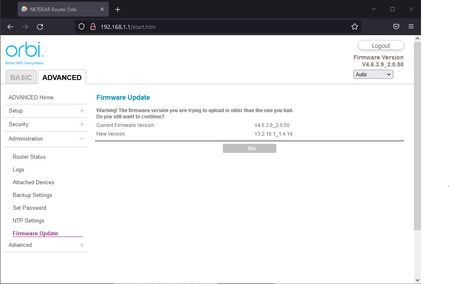
Trying to do a manual revert back to the previous 3.2.18.1_1.4.14 firmware but that gives a page with:
Firmware Update
Warning! The firmware version you are trying to upload is older than the one you had.
Do you still want to continue?
Current Firmware Version V4.6.3.9_2.0.50
New Version V3.2.18.1_1.4.14With only a "No" button
screenshot
Happens in several browser so unable to revert back :(
Anyone having the same problems?

FURRYe38
Aug 24, 2021Guru - Experienced User
Perform a full factory reset on both router and satellite(s) then set up from scratch.
Disable AX mode on the RBR.
Set CTS to 2347 on the RBR.
Speed test with a wired PC and Ooklas installable speed test app to check speeds.
What is the Mfr and model# of the Internet Service Providers modem/ONT the NG router is connected too?
BartNG wrote:
Recently did a manual firmware update for the RBR850 and RBS850 to version 4.6.3.9 because of the security related fixes.
Somehow internet seems a lot slower since. 1-2 min interrupts are most noticable with streaming apps Netflix, Amazon Prime, Disney+ etc.
Trying to do a manual revert back to the previous 3.2.18.1_1.4.14 firmware but that gives a page with:
Firmware Update
Warning! The firmware version you are trying to upload is older than the one you had.
Do you still want to continue?
Current Firmware Version V4.6.3.9_2.0.50
New Version V3.2.18.1_1.4.14
With only a "No" button
screenshot
Happens in several browser so unable to revert back :(
Anyone having the same problems?
ETyahoo
Aug 25, 2021Initiate
I had the exact same problem.
I have fiber 1Gbps up/down. Before upgrading to 4.6.3.9, I got about 300Mbps on wifi, but I got at best 20Mbps after upgrading.
I tried warm rebooting, changing channels, cold reboot, but nothing worked. The speed test on Orbi shows the speed I am supposed to get.
I ended up doing a factory reset. Now I got wifi speed better than before 4.6.3.9, getting about 470Mbps.
Got happy family again.