NETGEAR is aware of a growing number of phone and online scams. To learn how to stay safe click here.
Forum Discussion

Seattle206
Apr 07, 2025Aspirant
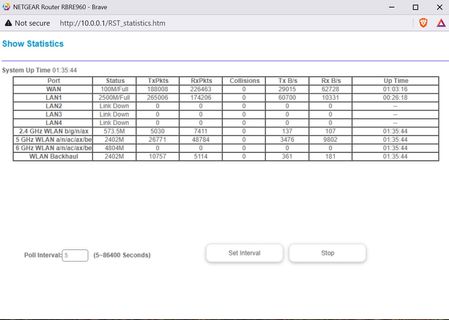
RBRE960 100M/Full Won't go over 100MBPS
Okay, I have the AX2700 WiFi Cable Modem Netgear (CAX30S) and the AC3200 WiFi Router (R8000) Nighthawk, and I've upgraded to the RBRE960 Mesh with an extra satellite. ISP: Spectrum Internet 400 Mbp...
Seattle206
Apr 08, 2025Aspirant

schumaku
Apr 08, 2025Guru - Experienced User
The poor downstream on the cable network is not the cause for the limited LAN connectivity which does work at 100 Mb/s only, leading to these 11.x MB/s data rates. The number is the very obvious indicator for a Fast Ethernet link in gte data path. Typical cause, leaving an issue alone, is very likely on the Layer 0, bad cable and/or bad connectors.
- plemansApr 08, 2025Guru - Experienced User
You've got multiple differnt things going on.
1. you're only connecting at 100mbps. Indicative of a bad cable/port. While the cable works cax30-->PC, some devices are more tolerant of sketchy cables. Routers tend not to be. Try a different cable and ensure its going directly cax30--->RBR and not through any wall outlets.
2. your power levels are to high for the modem. its why its saying poor connection. You should be between -7.5dbmv and 7.5dbmv. You're way above that. You can try putting an attenuator in the line to help with that or even a splitters (makes sure the other ends are capped off)
