NETGEAR is aware of a growing number of phone and online scams. To learn how to stay safe click here.
Forum Discussion

Mechanic60
Mar 28, 2022Aspirant
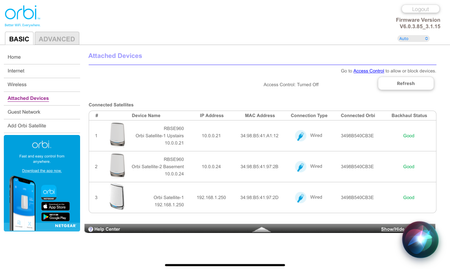
RBRE960 Extra Satellite shows up when using wired backhaul both in web app and Orbi app
Hi, I just installed my brand-new RBRE 960 Orbi And two satellites. They are working fine but both in the web app and in the Orby app I am seeing an extra satellite with a different IP address and a...
- Mar 29, 2022
I tried Netgear gigabit Five port switch I have. And the Issue went away. So the trend net switch is the issue. Thanks for all your help. It’s too bad because I wanted to use the 2.5 Gb switch for the bandwidth because I will be getting a 2 Gb connection to the Internet very soon. I will have to find another solution for a switch. Again thank you for your help.

FURRYe38
Mar 28, 2022Guru - Experienced User
Is this the first Orbi system you have had or have you had any others or anything else online? The 3rd RBS looks like a 8 series RBS that's connected..
How are the RBS connected to the RBR? Directly to the back or is there a LAN switch or wall jack or patch panel in between? IF there is a switch, what is the brand and model of this switch?
Mechanic60
Mar 28, 2022Aspirant
This is the first Orbi mesh system I have had. All previous routers have been disconnected and retired and are not connect to this system.
The Router is connected to the 2.5 gHz port to a TRENDnet 2.5 gHz unmanaged 5 port switch. Model: TEG-S350 /A.
That switch is then connected to the 2.5 gHz ports on both satellites. No other device is connected to this 2.5 gHz switch.
- FURRYe38Mar 28, 2022Guru - Experienced User
Very odd for sure. Have not seen this on mine.
What happens if you try this. Turn OFF both RBS and the LAN switch.
Refresh the RBRs web page and when you see the RBS disconnected. Select Remove for all RBS on the RBRs web page.
Use the RBRs web page to reboot the RBR. Wait for ready.
Take 1 RBS and near or in same room as the RBR, ethernet connect the RBS to the back of the RBR using the 1GB LAN ports instead.
Look at the RBRs web page. Does the RBS connect correct here and any odd mysterious RBS appearing? IF not, do same thing with 2nd RBS. Check for any mysterious 3rd RBS here...If not, connect 1 RBS to the RBRs 2.5Gb LAN port with the 2.5Gb LAN port on the RBS.
Check for mysterious 3rd RBS.- Mechanic60Mar 28, 2022Aspirant
So I did exactly as You asked. disconnected both satellites and the switch powered them down. cleared from router both satellites and then rebooted the router. waited till it came up. connected one satellite at a time to the 1G port of router and 1G port the satellite. both connected with no extra satellite seen. connected both to the 2.5 G port one at a time no extra satellite seen. then connected them both satellites back up and put them back in there locations and connected the switch. and the extra satellite came back up but showed as "out of sync".
This leads me to believe that a neighbor around me has a orbi satellite that is not syncing to they're own system. Thoughts?
Here is a pict of the "extra" satellite not synced.
- FURRYe38Mar 28, 2022Guru - Experienced User
OK so all the RBS is good up to connecting the RBS back in there locations.
Try this, turn OFF your RBS. Do same thing again by removing all RBS on the RBRs web page.
No go here and turn down the power output of the RBR to 25%, apply and let the RBR reboot:
Under Advanced Tab/Advanced Settings/Wireless Settings
Let the RBR sit for 5-10 minutes with out the RBS. Keep checking the RBRs web page for this 3rd RBS. If it doesn't reappear here, turn on your RBS thats in there locations.
Possible the 1st or 2nd RBS could be picking up a nieghboring RBS which that RBS should not be trying to connect.