NETGEAR is aware of a growing number of phone and online scams. To learn how to stay safe click here.
Forum Discussion

Mechanic60
Mar 28, 2022Aspirant
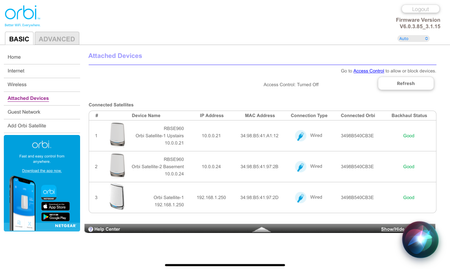
RBRE960 Extra Satellite shows up when using wired backhaul both in web app and Orbi app
Hi, I just installed my brand-new RBRE 960 Orbi And two satellites. They are working fine but both in the web app and in the Orby app I am seeing an extra satellite with a different IP address and a...
- Mar 29, 2022
I tried Netgear gigabit Five port switch I have. And the Issue went away. So the trend net switch is the issue. Thanks for all your help. It’s too bad because I wanted to use the 2.5 Gb switch for the bandwidth because I will be getting a 2 Gb connection to the Internet very soon. I will have to find another solution for a switch. Again thank you for your help.

FURRYe38
Mar 29, 2022Guru - Experienced User
I would also take the one west side RBS to same room as RBR and wirelessly sync it to the RBR. Check for 3rd RBS. If nothing, take the west side RBS back to its location and connect it using the different 1Gb switch.
Mechanic60
Mar 29, 2022Aspirant
I tried Netgear gigabit Five port switch I have. And the Issue went away. So the trend net switch is the issue. Thanks for all your help. It’s too bad because I wanted to use the 2.5 Gb switch for the bandwidth because I will be getting a 2 Gb connection to the Internet very soon. I will have to find another solution for a switch. Again thank you for your help.
- TC_in_MontanaMar 29, 2022Virtuoso
Mechanic60 Happy that you figured it out, unhappy with what it actually was.
So - basic question is - with that "ghost device" - was there any residual impact? Was the satellite still responding? Was the speed good?
If yes to both of these questions - then maybe you can still use the Trendnet switch - and just ignore the ghost satellite.
Is there an option to have one satellite wired and one wireless? If so, I guess the next question is - was it only when you had both plugged into the Trendnet switch that the ghost appeared? Did you try with just one (the one on the west end).
Lastly - I'm sure you did, but I have to ask. Did you change cabling between the switch and the west end satellite - just to see if maybe there was something with that cable that was causing the issue? If not, that's always a possibility. Maybe the issue isn't seen at 1Gbs where it is at 2.5Gbps.
So I know that you popped a Netgear 1Gbps switch in place of the Trendnet switch and all was good. Maybe one more test you can try.
I am not sure if you ever sync'd the satellite wirelessly before you wired it to the switch. Can you try unhooking the west end satellite from the cable and moving it into a location (could be next to the router) and have it sync up wirelessly first and stabilize (let it run for 5 - 10 minutes). Then move it back to the west-end location and plug it in to the cable from the switch and see if that helps. May be even better (although I don't know if your home layout allows for it) but if you can - is there a way you can put it somewhere that you can sync it wirelessly first - and then without unplugging it, hook it up wired to the Trendnet switch and see if the same thing occurs after it moves from wireless backhaul to wired backhaul.
I know it sounds like a lot of work, but it may resolve the issue - and you can have the 2.5Ghz wired connectivity you desire if it does.
- Mechanic60Mar 29, 2022Aspirant
There really wasn’t any impact other than the anomalous satellite showing up data rate it was good, but it was just annoying looking at the control software seeing that extra satellite in there and things like that bug me I’m kind of a perfectionist in that area.
I’m going to try to hook it up wireless backhaul and see if I have a loss of data because of the cement wall in between and the foil backing on that wall. I have in the past with other routers but I will give it a try with this new mesh system it’s one of the reasons that I bought the best mesh system that Netgear sells Because of the construction of my house and because of the addition that was done on my house and the way the walls are constructed (a lot of concrete). - FURRYe38Mar 29, 2022Guru - Experienced User
Does the Trendnet switch have any user configurations at all or just plain ol unmanaged?
- Mechanic60Mar 29, 2022Aspirant
No it is a straight unmanaged switch. The managed versions get very expensive as I was looking at them the next version of the switch which has management software is almost $250 more. And Netgear routers are two $250-$300 more. I honestly wish that they would’ve put 2 2.5 GHz ports on the back of the router on this Orbi so that you could run to backhauls to two satellites without any extra hub but that probably would’ve driven the cost even higher.
- TC_in_MontanaMar 29, 2022Virtuoso
Please make sure to mark the solution as Accepted so that anyone else with the same situation can search and see what the resolution is.
This does not lock the topic, so we can still discuss and come up with alternatives or different approaches to maybe keeping your Trendnet in the mix.
- brianldMar 30, 2022Apprentice
Just came across this thread, and thought I'd chime in. Glad you sorted it out to being your switch. FWIW, I have been using a Zyxel 2.5G unmanaged switch that I found on Amazon (model is MG-105). I have this connected to my RBRE960 setup for wired backhaul, and it works just fine.
- FURRYe38Jul 11, 2022Guru - Experienced User
What is the model # of the TrendNet switch?
Mechanic60 wrote:
No it is a straight unmanaged switch. The managed versions get very expensive as I was looking at them the next version of the switch which has management software is almost $250 more. And Netgear routers are two $250-$300 more. I honestly wish that they would’ve put 2 2.5 GHz ports on the back of the router on this Orbi so that you could run to backhauls to two satellites without any extra hub but that probably would’ve driven the cost even higher.
- _AT_Jul 22, 2022Aspirant
Thanks for your post on this, I have exactly the same issue. I have the 960 series, and 4 satellites. This week I have gone from a wireless backhaul to a wired backhaul using the 2.5G ports, and a Trendnet 5 port 2.5G switch. (I wanted to use a 2.5G port unmanned switch for the backhaul as the orbi can do this).
The software is showing 8 satellites now, in the same manner on the software as yours was.
so far I haven’t seen any issues with performance. It’s just annoying that the software is showing all these extra satellites, and with the 192.168.1.x subnet.
I have a case open with Netgear support, I’ll just send them this link to show what the issue is.
It’s strange that a unmanaged basic switch does this, and a netgear one doesn’t? I wonder if a orbi firmware update will resolve the issue? I’m running the latest firmware (same as you are).
- FURRYe38Jul 22, 2022Guru - Experienced User
What brand and model Switch are you using?
_AT_ wrote:
Thanks for your post on this, I have exactly the same issue. I have the 960 series, and 4 satellites. This week I have gone from a wireless backhaul to a wired backhaul using the 2.5G ports, and a Trendnet 5 port 2.5G switch. (I wanted to use a 2.5G port unmanned switch for the backhaul as the orbi can do this).
The software is showing 8 satellites now, in the same manner on the software as yours was.
so far I haven’t seen any issues with performance. It’s just annoying that the software is showing all these extra satellites, and with the 192.168.1.x subnet.
I have a case open with Netgear support, I’ll just send them this link to show what the issue is.
It’s strange that a unmanaged basic switch does this, and a netgear one doesn’t? I wonder if a orbi firmware update will resolve the issue? I’m running the latest firmware (same as you are).
- _AT_Jul 22, 2022Aspirant
Hi,
the switch used for the wired backhaul is:
Trendnet 5 port unmanaged 2.5G switch, Model: TEG-S350
- FURRYe38Jul 22, 2022Guru - Experienced User
Seen some non NG branded and some non managed switches with IEEE 802.3az "Green Ethernet" cause problems in between the RBR and RBS. NG GS-105/108v4 and GS308v3, D-Link DGS-105/108 and HP ProCurve 1400/1800 series switches work for Orbi systems. Need to add that XS505M and GS110MX work great with the 9 series.
Also CAT6 Lan cable is recommended.
Also avoid using the 2.5Gb ports on the RBS for ethernet backhaul with 1Gb switches. Use the 1Gb ports on the RBS.
I would swap out the Trendnet for NG something else. As the OP mentioned this was solved by them putting in a NG switch.
_AT_ wrote:
Hi,
the switch used for the wired backhaul is:
Trendnet 5 port unmanaged 2.5G switch, Model: TEG-S350
- _AT_Jul 22, 2022Aspirant
Hi,
I have just ran CAT6 throughout the house, and tested all connections. So that’s good.
I did look at the NG 2.5G switch option, it’s triple the price of the Trendnet. But I guess there is a reason for that (it works better)..
I’ll have another look at the switch, and look at returning the Trendnet. (Assuming netgear support are going to say the orbi firmware cannot be updated for 3rd party unmanaged switches different working specifications).
Thanks for your assistance.
- FURRYe38Jul 22, 2022Guru - Experienced User
You can go the cheap way and get some NG GS 1 series 1Gb switches if you want to go that router. For the 2.5Gb speed support though, you can try the GS110MX which was cheaper than the XS505. I bought the GS110 as I need one more in the daisy chain to support my 1 RBS in the basement on 2.5Gb port.
- _AT_Jul 22, 2022Aspirant
I’ve done a return on the Trendnet, and ordered NG XS508M instead, as I need 5 ports..
Fingers crossed this will sort the issue.
Thanks.
- FURRYe38Jul 22, 2022Guru - Experienced User
OK. Kewl. I just put in a 10Gb SFP to ethernet adapter on my 505. Works great.