NETGEAR is aware of a growing number of phone and online scams. To learn how to stay safe click here.
Forum Discussion

Steve49G
Aug 12, 2024Aspirant
RBS750 Connectivity / Firmware
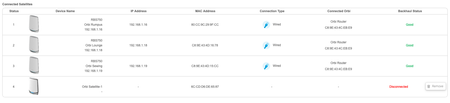
I have been through the wonderful community to try and get this working, I simply want to add another satellite. I believe that its firmware related, the RBR and 3 other RBS are all ok, this new ...

FURRYe38
Aug 12, 2024Guru - Experienced User
Try this to see if this works:
Manual RBS FW update after RBR was updated:
You need to update the RBS before updating the RBR. Or update any new incoming RBS to same version of FW as current system is using. Keep this in mind for future updates.
What you need to do is factory reset the RBS. Wire connect a PC to the 1st satellite📡. Already have the most current FW version files downloaded on to this PC.
Wire connect 1 PC to the back of the RBS. Factory reset the RBS, wait about 5 minutes. The PC will get a IP address from the satellite📡. The RBS will be 192.168.1.250 for Orbi AC/192.168.10.250 for Orbi AX. Use this IP address in a web browser to log in to the satellites web page. Log in as admin and password. Use the satellites 📡 web page FW update feature to select the FW update file that was unpacked from the .zip file. Then factory reset and then re-sync the satellites 📡 to the RBR.
Id turn OFF all other RBS while you work with the new incoming RBS...
- Steve49GAug 13, 2024Aspirant
Appreciate the help, I have tried everything without success, I cannot get the laptop or a Mac to connect to either of the IP addresses. I have scanned the QR code but it will not join that wifi point either, or tried to connect to the RBS wifi from the laptop, no success.
I have even turned off off the RBR and the other RBS's so there is no confusion at all, its so frustrating I feel like dumping all the Orbi's as its just not user friendly compared to others I have used.
There has to be an easier way to get the firmware on this device.- FURRYe38Aug 14, 2024Guru - Experienced User
Did you happen to set a static IP address and sub net mask on your ethernet connected PC that was connected behind the RBS after it was factory reset? Might set this to 192.168.1.49/255.255.255.0 then see if you can access 192.168.1.250 or 192.168.10.250 after doing a factory reset on the RBS and waiting 5 minutes.
Could see if maybe NMRPFlash app could work with a windows PC:
https://github.com/jclehner/nmrpflash
Video walk through using a tftp client. Use the built in one for windows 10 though. the video is more of an example of how its done:
https://www.youtube.com/watch?v=hXhMgQS5k1o
https://www.youtube.com/watch?v=R9DLrLQrpaw- Steve49GAug 17, 2024Aspirant
Thanks for all the advice, I have sent this back to the retailer for them to do an upgrade for me, its was getting to my limits of technical ability so see how we go.